


 |
 |
 |
 |
 |
|
 |
 |

-
22 - Part 7 – Accounting
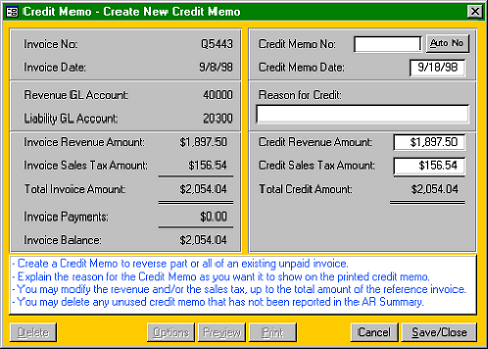
The reference invoice (#Q5443)
information is displayed in the
left-hand side of the form.
The right-hand side of the form
is the new credit memo
information. You may enter
your own Credit Memo
Number, or the system will
create a unique number by
clicking the Auto No. button in
the upper right of the form.
The Credit Memo date can be
any date, not before the
reference invoice or before the
latest AR Summary report.
Enter the Reason for Credit in
the text field provided. You
have 75 characters available.
The text entered into this field
will print in the description area of the actual printed Credit Memo (for your customer).
The total revenue and tax amount of the reference invoice is entered into the Amount fields. You may enter any
amount of revenue to credit, up to the original amount of the invoice. If another credit memo exists, the system will
further limit the credit revenue amount to the original invoice revenue amount less any other credit memos already
pending.
You may enter any amount of sales tax to credit, up to the original amount of the invoice sales tax. If another credit
memo exists, the system will further limit the sales tax amount to the original invoice amount less any other credit
memos already pending.
The Total Credit Memo Amount will be computed and displayed.
Once any part of the credit memo revenue or tax amount is used, two additional lines of information will appear on
the right-hand side of this form: Credit Used and Credit Remaining.
Save the Credit Memo to make it available for printing.
Note: Click the print options button to preset the number of copies and the routing information for the printed
Credit Memo. This button function is identical to the Options button on the various invoice forms.
Once the Credit Memo has been saved, you may print a copy to mail or fax to your customer. You may preview the
Credit Memo, if desired.
Credit Memos appear in the credits tab (see Customer Account Detail on the previous page). Reference to the CM
will also appear in all accounting reports, customer statements, customer ledgers, etc.
|
 |
|