


 |
 |
 |
 |
 |
|
 |
 |
Part 7 – Accounting - 23 -
Application of Credit Memos:
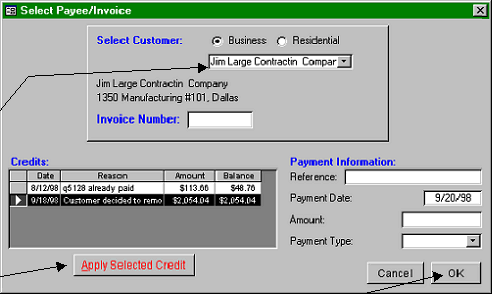
To apply the credit memo to the reference invoice (or any other invoice for the customer):
1.
Click Enter Invoice
Payments from the menu
bar. Or, click the “$”
toolbar button. This is the
same function as for
entering customer payments.
2.
Select the customer (process
is identical to payment
application)
3.
Select the specific Customer
Credit by clicking on the
desired credit (in the box on
the lower right of the form).
4.
Click the Apply Selected
Credit button. the
Reference, amount, and payment type will be filled by the system.
5.
Click OK. Your regular payment application form will appear, enabling you to apply the credit to any one or
more outstanding invoices. The reference invoice will be selected by default.
Notice that two credits appear in the Credits:window.. The first one is a previous overpayment by the customer.
The second one is the Credit Memo with its explanation. The credit memo has been highlited (selected).
Once all or part of a credit memo is applied to an invoice, the system will not allow deleting or changes to that
Credit Memo. If (after application of the credit memo to an invoice) you desire to make changes, you may us the
function “Cancel Payment” from the menu bar Accounting menu to cancel the payment application. This reverses
the payment application process, which enables editing or deletion of the credit memo.
|
 |
|