


 |
 |
 |
 |
 |
|
 |
 |

-
6
-
Part 5 – Other Features and Functions
Close the form when finished to save your settings.
VACATION TAKEN
Quantrac 2005 will compute vacation time accrued since date of employment, subtract vacation days taken from the
date of employment to the calculation date, and compute remaining vacation days accrued but not taken. To do this,
each day of vacation must be recorded using the Vacation Logging function. To begin, bring up your list of
employees from the toolbar button at the bottom of your screen. Then, click on the Vacation Calculator button to
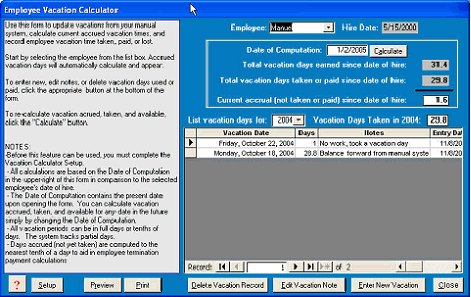
reveal this form:
From the combo box (top-
middle), employee Manuel was
chosen. His hire date, vacation
days earned and taken, and
vacation days accrued but not
taken are dis-played in the top
half.
The lower half displays vacation
days taken in the selected year.
Clicking the “Year” combo box
can show the previous year’s
vacation history (if any exist).
From this form, the user can also
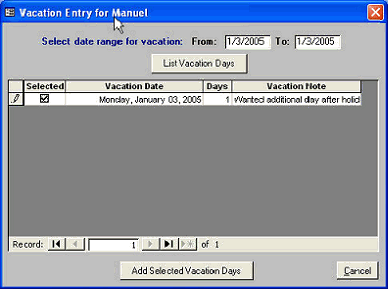
record new vacation days taken. Click the Enter new Vacation button:
This form is used to enter new vacation
days taken for a selected employee. In
this example, one day of vacation is ready
to
be added for employee, Manuel. In this
example, clicking the Add Selected
Vacation Days button will add this one day
to
Manuel’s 2005 vacation days.
If you select one full 7-day week in the
“From” and “To” fields, the system will
enter all seven days in the list and
automatically check each weekday as
“Selected” and leave Saturday and Sunday
not
selected. You may change which days of
the
week you wish to charge to the employee
using the “Selected” check box.
A Vacation Note is not required, but it can be used as a reminder when an employee wishes information about his/her
vacation history.
|
 |
|