


 |
 |
 |
 |
 |
|
 |
 |

Part 5 – Other Features and Functions
-
5
-
Vacation Calculator
One of the difficult tasks of an HVAC contractor/dealership human resources department is the accurate
computation and logging of employee’s vacation days.
This feature of HVAC Office makes the following assumptions:
The HVAC Dealership has a definite policy regarding vacation accrual
Vacation time is accrued beginning on the employee’s date of hire.
Vacation time will be computed based on days earned per week (52 weeks per year)
Vacation time can be taken or compensation paid in increments of 1/10th days
Vacation time can be accrued on three separate schedules, each with it’s accrual rates
o
Schedule #1: Initial user-defined term and rate of accrual for new employees; typically either one or
two weeks earned per 52 weeks of employment
o
Schedule #2: Second user-defined begin date rate of accrual and for existing employees; an example
being a benefit package which provides for two or three weeks earned per 52 weeks of employment
after five years of continuous employment.
o
Schedule #3: Third user-defined begin date and rate of accrual for employees; an example being for
an employee with 10 years of employment earns three weeks of vacation per 52 weeks of continuous
employment
VACATION EARNED (ACCRUAL)
A typical company setup might include the following:
Schedule #1: Five days of vacation shall accrue for the first 52 weeks of employment with accrual
beginning on the date of employment and continuing every year thereafter if Schedule #2 and Schedule #3
fields are left blank.
Schedule #2: Ten days of vacation shall accrue for every 52 weeks of employment with accrual beginning
on the employee’s hire date plus one year and continuing at this rate for every year thereafter (if Schedule #3
fields are left blank).
Schedule #3: Fifteen days of vacation shall accrue for every 52 weeks of employment with accrual
beginning on the employee’s hire date plus ten years.
The HVAC Office Vacation Accrual system calculates vacation accrual at any rate per year.
SETUP
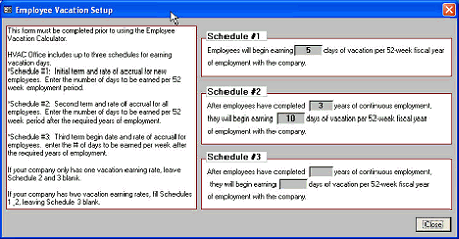
Before the Vacation Calculator can be used, it must be set up to your company’s vacation policy. To access
Vacation Setup, click from the Menu Bar, Setup|Employees. At the bottom of the list of your employees, click the
“Vacation” button and then the “Setup” button to display this form:
In this example, the company
benefit package includes 5
days of vacation accrual
beginning on the first year of
employment. After three
years employment,
employees begin earning
vacation time at a rate of 2
weeks per year. These are
the only two accrual
schedules at this company.
|
 |
|