


 |
 |
 |
 |
 |
|
 |
 |
-
4
-
Part 5 – Other Features and Functions
Use your imagination! Almost all office communications and reminders that you now have on paper can be
computerized using Quantrac 2005 E-Mail. This feature is extremely easy and fun to use…and will quickly become
part of your normal office operations.
Quantrac 2005 Inter-Office Message Maintenance
As you use E-mail, the system stores all messages. The computer saves even deleted messages, just in case ever
needed. Your System Administrator can access all messages by clicking (on the menu bar),
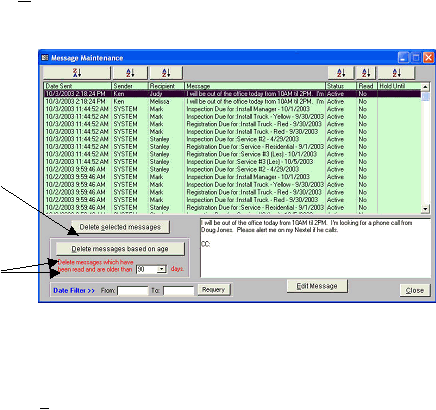
“Maintenance|Message Maintenance”. This is the Message Maintenance form:
Here, all messages are listed. You
may delete messages by age or by
selecting and deleting a specific
message from the list.
To delete one or more specific
messages, click your mouse on the
desired message(s). Then click the
“Delete selected message(s) button
To delete by age, select the aging from
the combo box and then click the
“Delete messages based on age”
button.
Sort buttons above each column can sort messages on demand six different ways.
Notice that when you click on a message, the entire text is viewable in the large lower window. If you wish to
change the text of the message, click the Edit Message button. The text will be presented in a read/write window.
System managers and others with Message Maintenance rights can sort and scan messages for important
communications between employees.
We recommend that you perform message maintenance at least once every three months, deleting all old messages,
to keep your system operating at maximum speed.
|
 |
|