


 |
 |
 |
 |
 |
|
 |
 |
Part 3 - Using Quantrac 2005
-
23 -
7.
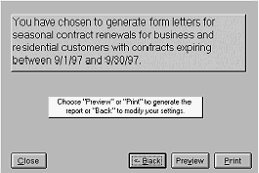
Click the Next button to display this form:
8.
To preview and/or print the letter(s), see
Previewing/Printing a Report at the end of this
chapter.
Creating Invoices for Maintenance Contracts
To create an invoice for a Maintenance contract, click the Invoice button at the bottom of the form. This will cause
the system to either create a new invoice with a unique invoice number and the prefix “QM” (e.g. QM12345). If
there are pre-existing Customer invoices, a list of the existing invoices will appear for viewing. Click “New Invoice”.
See “Invoicing” in this chapter for instructions regarding invoice completion.
Creating Service Agreement Contracts
Using Quantrac 2005 Attachments, any word processor, text editor, publishing software, or other computerized
composition software; you can create actual Service Agreement Contracts to submit to your clients. See Attachments
elsewhere in this manual for specific instructions.
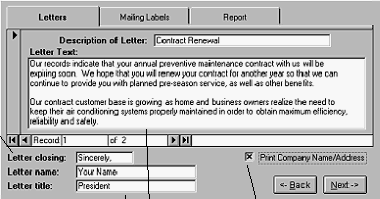
The first time you see
this form, you will need
to personalize the
“Letter closing”, “Letter
name” and “Letter title”
fields. This information
will be saved for future
use.
Note that this is “1 of 2”
records. Quantrac 2005
is able to store multiple
form letters. It comes
with two sample letters,
which you will probably
want to modify for your
own company. To select
the desired form letter,
click on these arrow
keys. To add a new
form letter, click the right
arrow key until the Letter
Text box is blank.
Click this box if you
want your company’s
name and address to
print at the top of your
letter. If you are using
your own letterhead,
do not select this
option.
Update the
Letter Text,
as desired.
Any
changes
will be
saved for
future use.
|
 |
|