


 |
 |
 |
 |
 |
|
 |
 |
Part 3 - Using Quantrac 2005
-
21 -
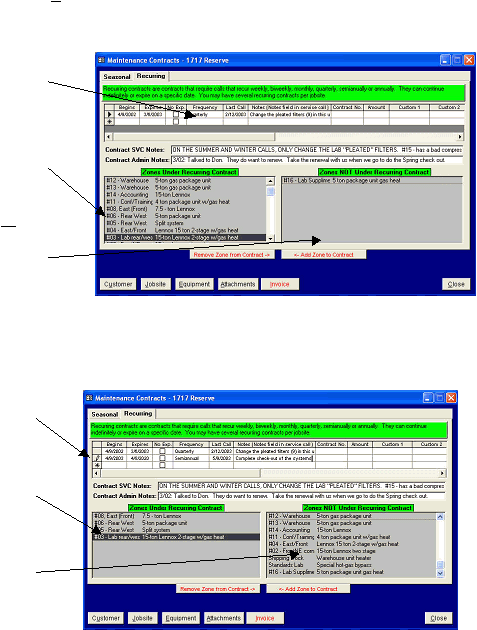
Recurring Contract Agreement Form
This is a typical Recurring Contract form for a commercial customer. It was generated by selecting the Customer
and Jobsite, then clicking the Contracts button on the Jobsite form. Then, the Recurring tab was clicked to show the
recurring contract form. In this example the customer that has several zones with different maintenance schedules for
each.
This following example is for the same customer and jobsite, but a different schedule line was clicked. Notice that the
equipment in the Zones Under Recurring Contract has changed, indicating which equipment is covered under this
frequency schedule.
Utilizing this example, Quantrac 2005 will create four Quarterly calls (every three months) two semi-annual calls
(twice per year), beginning on 4/10/2003.
Notes:
1.
You may have an unlimited number of combinations of zones and frequency schedules.
2.
When you create a new contract, leaving the “Last Call” column blank will result in the first schedule call being
created on the first day of the contract. Subsequent calls will be based on the previous call date and the scheduled
frequency.
The Quarterly frequency was
selected by clicking the
mouse in the selector box to
the right of the tabular row
The equipment zones
covered under this quarterly
mainten-ance schedule are
listed in this box.
The equipment zones not
covered under this quarterly
maintenance schedule are
listed in this box.
The Monthly frequency was
selected by clicking the
mouse in the selector box to
the right of the tabular row
The only zones under
contract for this are the East
Front, Rear West, and Lab.
The remaining zones at this
jobsite are not on a Semi-
annual schedule.
|
 |
|