


 |
 |
 |
 |
 |
|
 |
 |
-
2
-
Part 5 – Other Features and Functions
Quantrac 2005 Inter-Office Messaging
A standard feature of Quantrac 2005 is the ability to communicate between users, leaving messages, memos, notices,
and alerts. In addition, future tasks requiring attention at maturity can be entered…where the system will alert the
appropriate user on the designated day. We call this feature Inter-Office E-Mail.
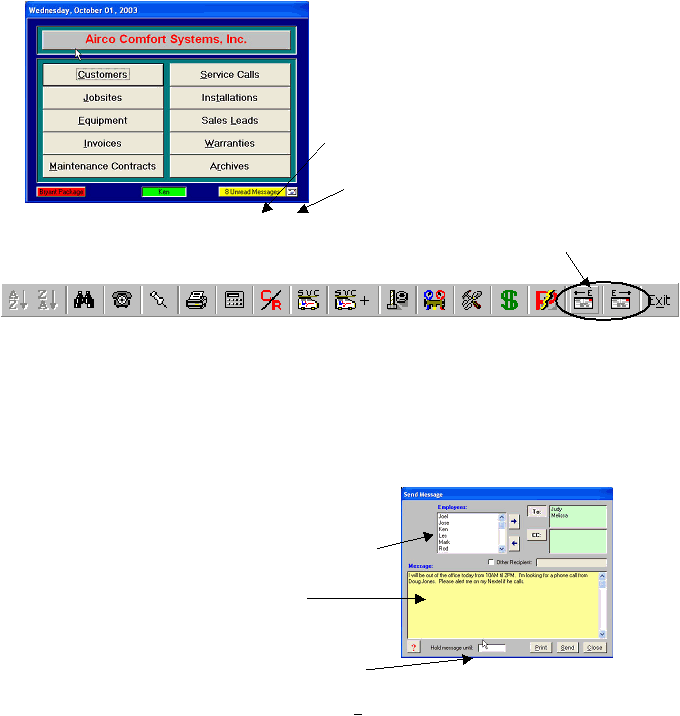
There are two buttons on the toolbar and one indicator on the main control form for user operation.
Message Indicator: This indicator will illuminate indicating
that you have messages waiting, and the number of messages
waiting for you to read.
Message Indicator Button: You may click this indicator (as
if it were a button) to quickly view the list of messages
addressed to you.
Check Messages: This button causes the system to check
for new messages addressed to you. (The system automatically
checks frequently)
Access received messages (left button)
Access ‘Send Message’ (right button)
When you start Quantrac 2005, your logon identifies you to that computer as the local user. All messages addressed
to you can be accessed on the computer on which you have logged onto. You may log onto any computer in the
network, and access all messages addressed to you. Also, when you send a message to another user, the process
identifies the sender to the recipient. The sender is established by the logon identity.
Sending Messages
Click the right-hand Messaging button on the tool bar to bring up the Send Message form.
First, select “To” or “CC” for the primary recipient(s) or
courtesy copy recipient(s).
Then, select the recipient from the list of active employees in
your company. Double-click on the selection to move it to the
“To” field or the CC field (depending on which button clicked).
Enter the message text in the large text field here.
If you wish this message to be held by the system until some
future date, enter that date here. For example, you may wish to
send yourself a message reminding of Corporate Estimated Tax
due date on June 16th.
After entering the recipient and the message text, click the Send button to actually send the message.
|
 |
|