


 |
 |
 |
 |
 |
|
 |
 |
-
12 - Part 5 – Other Features and Functions
Update Area Codes
One of the newer Quantrac 2005 features is the Area Code Update function. As your telephone company runs out
of telephone numbers in a given area code, they may divide your single area code into two or more areas. This
seemingly simply telephone company change can play havoc with your database. To help cope with the changes,
Quantrac 2005 has the ability to change the area code of any prefix to the newly assigned code very quickly and
efficiently.
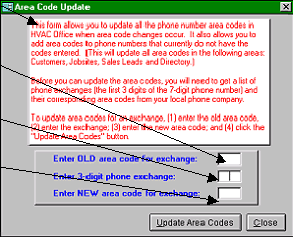
First, click, on the Menu bar, Utilities|Update Area Codes to display this form:
Instructions for the use of this function are printed on the form here.
1. Enter the “old” area code that you wish
to change here.
2. From the list of your city’s list of
telephone prefixes and their area code
assignments (provided by your telephone
company), enter the selected telephone
3-number prefix here.
3. Enter the new 3-digit area code for that
prefix here.
4. Then, click the Update Area Codes
button. The system will first confirm
your request and then complete the action.
The system will search for all telephone numbers within the system containing the prefix and old area code selected,
changing the area code to the new area code specified.
|
 |
|