


 |
 |
 |
 |
 |
|
 |
 |
Part 3 - Using Quantrac 2005
-
19 -
7.
As you receive the renewals from customers, update the Maintenance Contract form in Quantrac 2005.
With this scenario, it is almost impossible to miss a preventive maintenance service call. Renewal rates have been
documented at 92% – 95%, with greatly improved customer satisfaction.
Recurring Maintenance Contract Agreements
Quantrac 2005 also has a completely separate process for recurring or calendar-based service obligations. An
example of this might be a pet store/dog-grooming salon where several systems may be involved, each with a different
schedule of maintenance. With the Recurring Contracts scenario, you can have a different schedule for each
equipment zone at the jobsite. For instance, the system that serves the dog grooming area may have scheduled
maintenance once per week, while the pet store area can simultaneously have scheduled quarterly maintenance. The
system allows you to establish separate daily, weekly, bi-weekly, monthly, bi-monthly, quarterly, semi-annual, or annual
scheduled maintenance calls on any number of equipment zones at the jobsite. As you can see, the recurring
maintenance agreement can be adapted to a wide variety of complex applications.
Each day, Quantrac 2005 analyzes all jobsites and their recurring contracts. The system creates a ‘Scheduled’ service
call for any jobsite and equipment zone in advance of the actual scheduled date, by the number of days based upon
your system customization setup (see Setup|Other from the menu bar). To help you plan your upcoming work
schedule, reports exist that look into the future (for up to one full year) and list each recurring call obligation.
The recurring contract process includes the following items:
1.
As you sign customers to your recurring maintenance agreement, fill the Recurring Maintenance Contract form,
with the begin date, end date, (click “No Expiration if you want the contract to never expire) the call frequency,
any notes that you want in the service call notes field, zones under contract, etc.
2.
The system will automatically create recurring maintenance calls for the calculated due date, the first call
scheduled for the initial date of the contract. The calls that the system creates will all appear in the service
scheduler for the date due.
3.
Your dispatcher will, on the due date, send a technician to service the customer.
4.
When the call is completed, it should be archived into the jobsite’s history.
5.
On a monthly schedule, print renewal letters to all customers with contracts that will expire during the following
month.
6.
As you receive the renewals from customers, update the Recurring Maintenance Contract form in Quantrac 2005.
(Contracts with “no expiration” do not need renewal, and will continue to create scheduled service calls year after
year with no other requirements.)
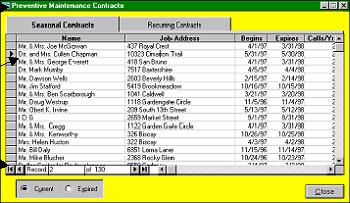
Maintenance contracts can be accessed from two points within Quantrac 2005. From the Main Control Form, click
the Maintenance Contracts button to view the two types of contracts for all customers, Seasonal and Recurring. Also
available on this form is the ability to view the list of expired contracts, (those which ran their one-year term and were
not renewed).
Alternately, click the Contracts button on the Jobsite or Service Call form to view, edit, or create a maintenance
contract for that customer’s jobsite.
Click on the tab to view a list of
either Seasonal or Recurring
Contracts.
Double-click on a selected line to
view the actual contract form.
Select either Current or Expired to
view the desired list for either
Seasonal or Recurring contracts.
|
 |
|