


 |
 |
 |
 |
 |
|
 |
 |

Part 3 - Using Quantrac 2005
-
17 -
Non-Revenue Employee Assignments
The Non-Revenue Assignments feature gives the capability to record, maintain, and report employee assignments such as
vacations, holidays, jury duty, etc. These assignments can be created for either "Paid" or "Unpaid" hours. This feature is
especially useful for companies using the Employees Timesheet report for hourly pay purposes.
Initially, you must setup defaults before creating actual assignments. From the Menu bar, click Setup|Non-Revenue Assignments.
The setup is very simple. Refer to “Setup Non-Revenue Assignments in Chapter 2 of this manual. Or, follow the instruction on the
form.
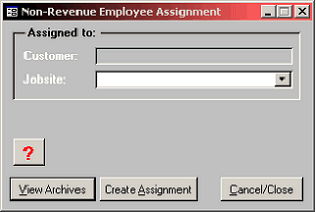
To use this feature, click Functions|Non-revenue Assignments on the main menu bar. This Control Form will be displayed:
First, select the assignment jobsite from the combo box list. If
you begin entering the address into the field, the system will
complete the address with the first known match. If there is
more than one customer for the selected jobsite, scroll down
the jobsite list and click on the jobsite with the desired
customer. When you select a Jobsite address, the Customer’s
name will appear in the field above.
Note: Some assignments will not have “Jobsites” (i.e. doctor
appointments, holidays, vacations, etc). We suggest that you
use your company’s facility address for the jobsite for those
instances. Of course, first you must establish your HVAC
company as a customer in your Quantrac database.
Click the Create Assignment button to create the new Assignment.
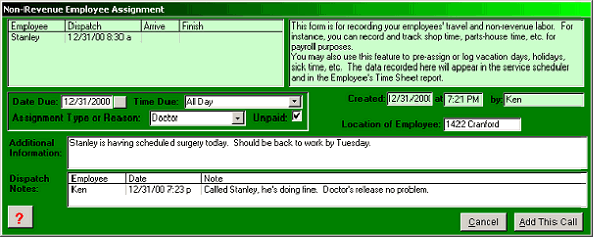
This is an example of a non-revenue assignment. Notice that this is an “unpaid” assignment. The hours for Stanley for this day
will be reported as uncompensated hours in the Employee Timesheet Report. The employee times operate like the same fields in
service and installation assignments. You can change the Location of Employee here if you wish. The Additional Information
field can contain an unlimited number of characters. Each Dispatch Note can contain up to 255 characters in addition to the
employee and date stamp.
Non-Revenue assignments can be utilized for multiple days. For instance, vacation time for an employee can be logged for
consecutive days so that an entire vacation (for instance) can be scheduled.
The non-revenue assignment will appear in the service scheduler until it is archived, helping to organize company resources for
your day-to-day operations. You can pre-enter the “Arrive” and “Finish” to remove it from the scheduler.
|
 |
|