


 |
 |
 |
 |
 |
|
 |
 |
Part 7 – Accounting - 9 -
Setting up General Ledger Accounts
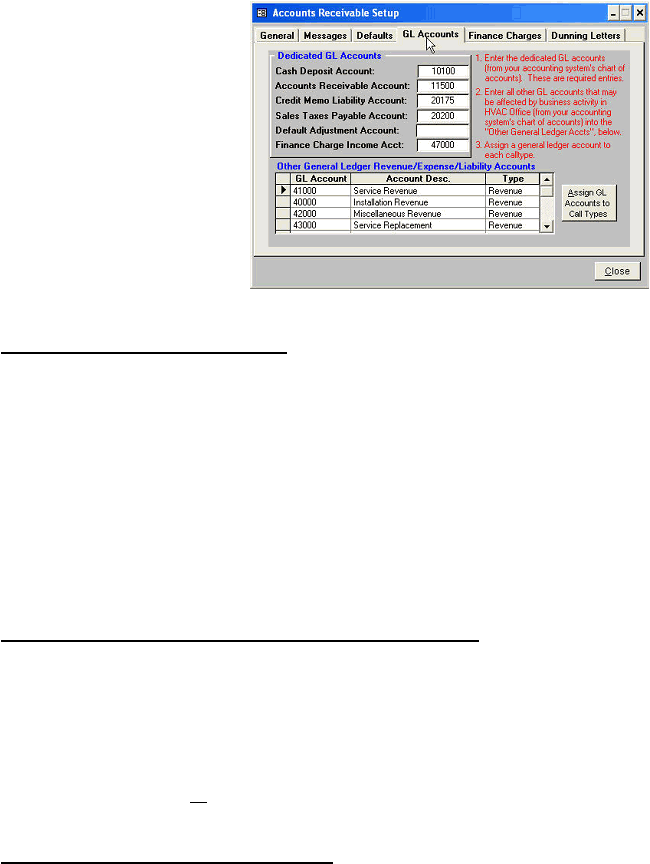
Quantrac 2005 keeps track of every
transaction that affects your cash
deposit, accounts receivable, and sales
taxes payable accounts, as well as all
revenue and adjustment accounts. You
must enter the account numbers and
descriptions here in order for the system
to produce accurate, meaningful, and
useful accounting reports. To display
this form, click on the GL Accounts tab
at the top of the Accounts Receivable
Setup form. Brief instructions, (numbers
1, 2, & 3) aid in completing this step.
Each entry is described in detail below.
Note: The “Other GL Revenue/Ex-
pense / Liability Accounts” are
presented in a scrolling list. The number
of accounts listed here is unlimited.
Step 1: Setting up Dedicated GL Accounts
Cash Deposit Account: This is the General Ledger account in which all receipts from your business activity is assigned. Most companies
have an interest-bearing bank account, which holds revenues until needed to make payroll, payables, and etc. payments. The AR Summary
report will report all receipts to this account.
Accounts Receivable Account: This is the General Ledger account in which all invoices are recorded. Adding an invoice to the system will
cause the Accounts Receivable account to increase by the amount of the total invoice, including tax (credit). Invoice payments will cause this
account to decrease (debit).
Sales Taxes Payable Account: This account will be increased by all sales taxes that are calculated for invoices. For instance, if you create
an invoice for $100.00, and the calculated tax is $7.00 (7%), the Sales Taxes Payable GL account will be increased by $7.00. The AR
Summary report will report all sales taxes payable in this account.
Default Adjustment Account: If you normally make adjustments to invoices to one account more often than others, enter that account here.
For instance, if your write-offs are usually to and Uncollectable AR account, you may enter that GL account number here. Entries into this
field are not required. This account will be the pre-entered account when adjusting receipts/invoices.
Finance Charge Income Account: Enter the finance charge revenue account from your accounting system’s Chart of Accounts. When
Quantrac 2005 calculates finance charges (late fees), this income account will be increased. The AR Summary report will report all Finance
Charge Income/Revenue in the account entered here.
Step 2: Setting up Other GL Revenue, Expense, and Liability Accounts
From your accounting system’s Chart of Accounts, enter the following types of accounts (Acct number, description, and type) here. You
may enter as many of these types of accounts as you have in your chart of accounts. For instance, you may have several revenue accounts.
(i.e., Service Revenue, Installation New Construction Revenue, Installation Remodel Revenue, Installation Commercial Revenue, Over the
Counter parts sales revenue, Maintenance Agreement Revenue, etc.)
Revenue Accounts: All revenue accounts from your Chart of Accounts should be entered here. Select ‘Revenue’ from the Account type. As
you create invoices, the ‘Invoice Type’ dictates which revenue account will be increased by the transaction. The sub total (minus discount
and not including sales taxes) affects revenue.
Expense Accounts: Enter the expense accounts from your Chart of Accounts that may be affected by business activity in Quantrac 2005.
Every expense account need not be entered here. You would, however, want to enter your uncollectable expense, refund expense, and
allowance expense accounts, since they will be affected by write-offs in Quantrac 2005.
Liability Accounts: From your Chart of Accounts, enter any liability accounts that may be affected by business activity in Quantrac 2005.
(i.e. Invoice Overpayments, Advance (Down) Payments, and invoiced Pre-payments).
Step 3: Assigning your GL Accounts to Calltypes
|
 |
|