


 |
 |
 |
 |
 |
|
 |
 |
-
8
-
Part 7 – Accounting
Setting up Customer and System Defaults
If you have been using Quantrac 2005, but only recently installed the Receivable module, you must manually set
these parameters for existing customers.
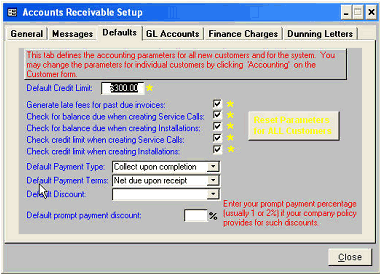
Each of the parameters are explained in detail below
Default Credit Limit: In this example, the default customer credit limit is set at $300.00. If the “Check credit limit when creating Service
Calls or Installations is X’d, Quantrac 2005 will notify the user if the credit limit is exceeded before establishing a new service call or
installation for that customer.
Generate late fees for past due invoices: If this box is X’d, the system will create Finance Charges and add them to your customer
statements. (See Finance Charges tab for finance charge calculation parameters) You may change this parameter for individual customers
from the Customer form.
Check for balance due when creating Service Calls: If this box is X’d, Quantrac 2005 will check customer balances for outstanding
invoices each time a new service call is created for that customer. This is to aid in collection of past due accounts before providing additional
billable services.
Check for balance due when creating Installations: If this box is X’d, Quantrac 2005 will check customer balances for outstanding
invoices each time a new installation is created for that customer. This is to aid in collection of past due accounts before providing additional
billable services.
Check credit limit when creating Service Calls: If this box is X’d, Quantrac 2005 will compute all outstanding invoices and alert the
operator if the outstanding balance is greater than the established limit for that customer.
Default Payment Type: Select a payment from the combo box list (down arrow). This list is derived from Setup|Lists|Payment Types on
the menu bar. The payment type will appear on the Customer and the Service Call forms. Its purpose is to aid the dispatcher to alert the
service technician regarding invoicing/collection for services rendered. You may modify the payment type for individual customers from the
Customer form.
Default Payment Terms: Select a Payment Term from the combo box list. This list is hard-coded in the system and cannot be altered. The
selected terms for each customer are used in the equation for determining when to begin computing finance charges. You may modify the
Payment Terms for individual customers via the Customer form’s, Accounting button.
Default Discount: Select an applicable discount (if any) from the combo box list. This list is derived from Setup|Lists|Discounts on the
menu bar. If a discount is entered for a customer, you will be notified that discounts may apply when previewing, printing, or closing an
invoice for that customer.
Defaulte Prompt Payment Discount: This sets your prompt payment discount (if any) to simplify writing-off (to the appropriate GL
account) the percentage of an outstanding invoice if payment meets your criteria. For instance, you may have an agreement with a high-
volume customer that if they pay within 10 days, they only have to pay 98% of the total invoice amount. When applying the receipt to the
invoice (in this case), the 2% discount and the GL Prompt Payment Discount account will appear in the invoice adjustment screen. If you do
not offer prompt payment discounts, disregard this entry.
Although completing the items on this tab is not ab-
solutely necessary for system operation, we recom-
mend completion to prepare for any future company
policies, such as computation and notification of
customer late fees. (Going back through a large
database later, one customer at a time, can be quite
time consuming)
The values inserted or checked here will apply to all
new customers as they are created in Quantrac
2005. You may also set these items in previously
es-tablished customers by clicking the Accounting
button located at the bottom of the Customer form.
Of course, individual customers can have cus-
tomized parameters. For instance, a large com-
mercial customer may have a Credit Limit of
$50,000; where most others might have a $300 limit.
|
 |
|