


 |
 |
 |
 |
 |
|
 |
 |
Part 7 – Accounting - 29 -
Dunning Letter Creation
You may wish to create Dunning Letters to alert your customer that outstanding invoices exist. Or, your accounts
receivable department may make personal visits or phone calls to attempt to procure payment. Quantrac 2005’s
Accounts receivable includes a system for creating pre-composed dunning letters and logging the creation of those
letters in a Dunning Log. In addition, the system includes the ability to log other collection attempts for each
individual invoice.
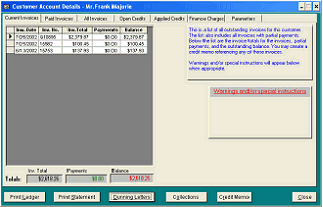
To access the control form for Dunning Letter Creation, first click the Accounting button on the Customer form.
The Customer Accounting Details form will appear for
the selected customer:
Notice that this customer has three invoices that are
outstanding. They are listed in the left-hand window
along with the date, original invoice amount, the total of
any payments, and the outstanding balance.
(To call up one of the invoices, double-click on the
selected invoice line.
The Dunning Letters button is in the bottom row of
buttons.
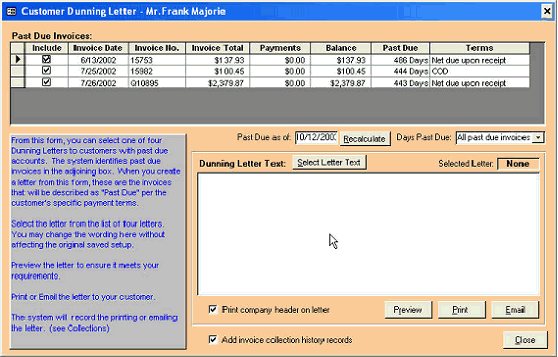
Click the Dunning Letters button to bring up this form:
The instructions for creating Dunning Letters is in blue type on the form.
|
 |
|