


 |
 |
 |
 |
 |
|
 |
 |
-
28 - Part 7 – Accounting
Aged Receivables
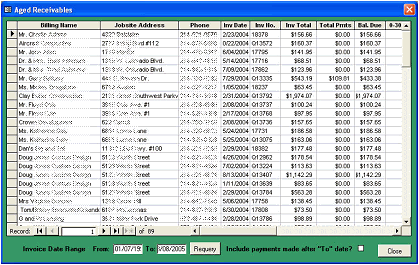
New in Quantrac2005 is a functional Aged Receivables form. To access this form, click Accounting|Aged
Receivables. The resulting form will appear:
This form is an functional Accounts
Receivables Report. It mirrors the
Aged Receivables report in the
repertoire of reports accessible from
the toolbar reports.
Using this form, you can filter the
results by Invoice date, showing only
invoices that were created between
selected dates.
Using this form you can also sort by
any column by simply clicking on the
selector box at the top of the column
and then use the A to Z or Z to A
buttons on the toolbar at the bottom of
your screen.
Using the scroll bar at the bottom of the form, you can scroll horizontally to see 0-30 days, 30-60 days, 60-90 days,
or over 120 days aging of each invoice collection. You can even sort on any of these columns.
This is a very user-friendly form, created to facilitate dunning activities. (especially live phone calls). If you
double-click on the Billing Name, Jobsite Address, or Phone fields for any line, you will be instantly transferred to
the invoice’s originating Customer form. If you double click on any of the invoice related fields, the actual invoice
form will appear. This feature is especially helpful when resolving late payments and justifications for billing with
late paying customers.
We believe your Accounts Receivables department will appreciate this new Quantrac2005 form.
|
 |
|