


 |
 |
 |
 |
 |
|
 |
 |

Part 7 – Accounting - 25 -
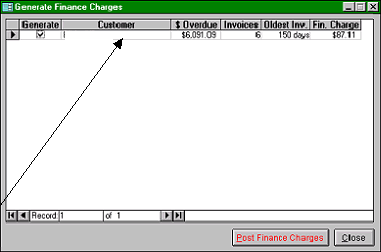
This form will indicate the customer(s), the total invoice amount which is past due, the number of invoices
comprising the total past due, the oldest invoice, and the total finance charges that will be posted. Here, customer
Miles Blake will be assessed $87.11 in finance charges for the month.
You may opt to omit generating
finance charges for this customer by
clicking the box in the ‘Generate’
column. In normal operation, you may
have a large number of customers who
will accrue finance charges, some of
which your company does not desire to
generate and post for the month.
Clicking the Generate box will cause
the check to vanish…and that customer
will not have finance charges posted
for the month.
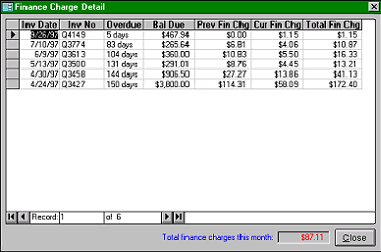
You may view the individual invoices,
which are overdue, along with the
finance charges for each by double
clicking on the selected customer.
This form allows you to view the individual
invoices, the previous finance charges, the
current finance charges (to be posted) and the
resulting total finance charges.
Each of these invoices meet the criteria of:
Past Due = Invoice date + Customer Terms +
grace period.
Each finance charge is based on the formula:
Amount past due x (APR/365) = Monthly
Charge.
The customer not be assessed finance charges
if the total of all invoice charges are less than
the minimum finance charge.
5.
To post the charges, click Close on the form and Post Finance Charges on the previous Generate Finance
Charges form.
6.
The system will ask you to confirm your intentions. Click yes (if appropriate).
7.
The system will indicate the number of invoices updated with finance charges and the total amount generated.
Miles Blake
|
 |
|