


 |
 |
 |
 |
 |
|
 |
 |
Part 7 – Accounting - 15 -
Beginning Balances
If the customers with an outstanding balances are not yet entered into Quantrac 2005, enter them now, following the
directions for entering new customers/jobsites in Part 2 of this manual.
1.
Select the customer to record the beginning balance.
2.
Click the Accounting button at the bottom of the customer form.
3.
Click the Modify Account button at the bottom of the Accounting Parameters form.
4.
Click the Beginning Balance button at the bottom of the form.
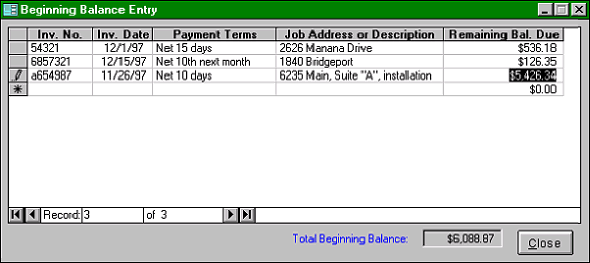
This Beginning Balance Entry form will appear.
Enter each original invoice number, the original invoice date, and a brief description. Also enter the remaining
balance due for this invoice and the original invoice terms. (the original date and terms are important for
calculating late fees.)
Close the form when complete. You will notice that the Account History tabbed form will display all outstanding
invoices (if any apply). This will leave an account balance for this customer.
We recommend that you complete this procedure for all customers with outstanding invoices before adding any new
invoices. As payments for any old outstanding invoices are received, they should be entered using the Add
Payment routine (described later in this chapter). All invoices and payments hereafter must be recorded in
Quantrac 2005.
If you create finance charges, the beginning balance invoices will be included in the finance charge generation,
along with all other subsequent invoices created in Quantrac 2005. As with all invoices, finance charges for
beginning balance invoices will be generated if the invoice due dates and grace periods have elapsed and the
invoices are still outstanding.
The revenue for beginning balances was recorded using your previous accounting system, and is therefore NOT
reported again from the beginning balance amount. All payments on these invoices IS reported in the accounting
summary, reducing your GL Accounts Receivable account and increasing your GL Cash Account.
Note: Before proceeding with this step, confirm that your “Begin Accounting” date is set to the date of your
oldest outstanding invoice. Failure to do this may result in improper operation and reporting of receipts.
Follow the procedures below if you wish to record outstanding invoices into your AR system.
|
 |
|