


 |
 |
 |
 |
 |
|
 |
 |
-
14 - Part 7 – Accounting
Accounting Parameters
When you completed your accounting setup, one of the tabs was “Defaults”. In this section you were able to set
credit limits, credit warnings, payment terms, etc. You may, however, wish to modify certain customer parameters.
For instance, you may have customers that you grant much higher credit limits than the standard limit. Or, a
customer may desire your company to obtain a purchase order number before taking new service calls or creating
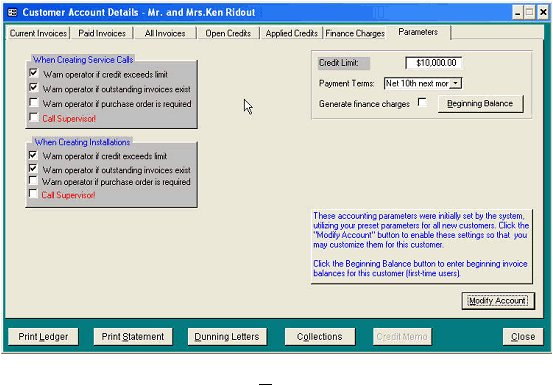
new installations. The following form allows customization of customer parameters for each customer. To view
this form, click the Accounting button at the bottom of the selected Customer form. Then click the Parameters tab.
To enable access to these parameters, click the Modify Account button.
You have the ability to create four different warnings when creating service calls and/or creating installations. All
warnings are completely separate and independent from each other.
1. “Warn if credit exceeds limit” – Causes the system to flash a yellow warning during the creation of a new
service call or new installation.
2. “Warn if outstanding invoices exist” – Will display the outstanding invoices screen, with totals…
3. “Warn if purchase order is required” – Will display a green warning that informs the operator that the customer
requires a purchase order before your office can provide service.
4. “Call Supervisor” - Will cause the system to flash a red warning whenever a new service call or installation is
created for the customer.
On this form, you can also modify the credit limit and payment terms for the selected customer. You can also turn
on/off the creation of Finance Charges.
We recommend that you allow existing receivables (from business prior to the implementation of Quantrac 2005) to
be paid and accounted outside this system. If, however, you wish to have Quantrac 2005 include these outstanding
invoices for specific customers, you may enter Beginning Balances for those customers. If you do, however, this
system will only contain the invoice amounts due and available for payment. The actual invoice will not exist in
this system.
|
 |
|