


 |
 |
 |
 |
 |
|
 |
 |
Part 7 – Accounting - 13 -
Customer Accounting Details and Parameters
If you wish to modify the default accounting parameters for an existing customer or to enter the parameters for a
customer, which was created without defaults, click the Accounting button at the bottom of the Customer form.
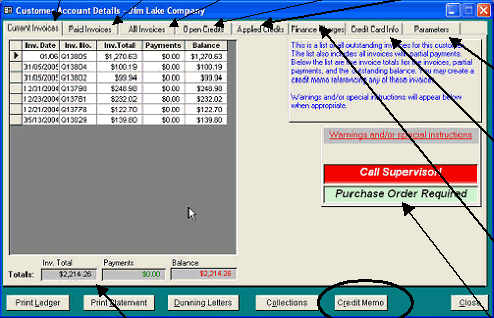
This Customer Account Details form will appear.
With the proper security clearance, you may alter the predetermined parameters by clicking the Modify Account
button (as noted above). We suggest that you restrict this right to your accounting department supervisor.
The next page describes customer parameters (customizable for each customer).
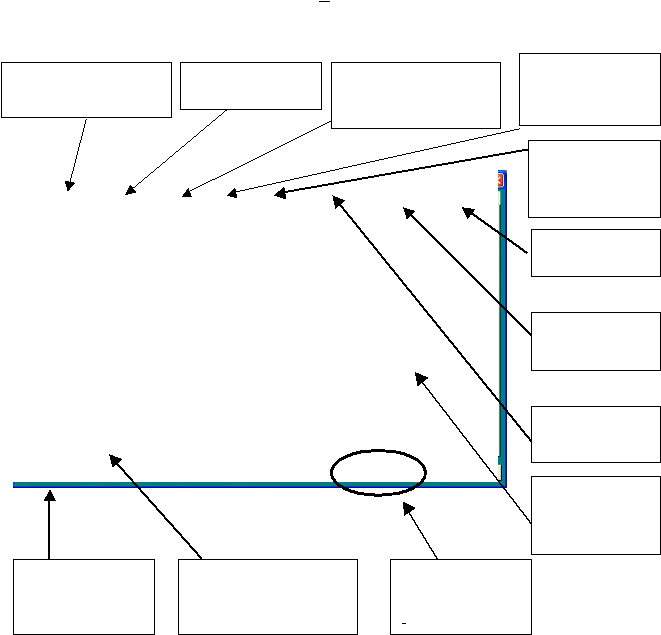
Click the Current Invoices tab to
view a list of all outstanding
invoices. Double-click on a se-
lected invoice to view it directly.
Click the Paid Invoices tab
to view the list of paid
invoices for this customer.
Click the All Invoices tab to view a
list of the entire invoice history for
this customer. Double-click on a
selected invoice to view it directly.
The total outstanding invoices for
this customer (to date) are $
2,214.26. Payments on these
active invoices and the balance due
are also shown.
This tab contains all active
credits and credit memos
for this customer. Double-
click on a selected invoice
to view it directly
This tab contains all
credits and credit memos
which have been applied
to invoices and are no
longer outstanding.
This tab contains a list of
all active finance charges
(which are yet unpaid).
To customize parameters
for individual customers,
click the Parameters tab.
This area contains
operator alerts that will
appear when service
calls or installations are
created (if desired)
Preview or print a Customer
Ledger for this customer.
click the Print Options
button and follow the on-
screen directions.
Create a credit memo for
any unpaid invoice. First,
click the invoice (in current
invoices). Then, click the
Credit Memo button.
Unlimited Credit Card
information for each
customer can be
recorded in this tab page
|
 |
|