


 |
 |
 |
 |
 |
|
 |
 |

-
12 - Part 7 – Accounting
Setting Up Dunning Letters
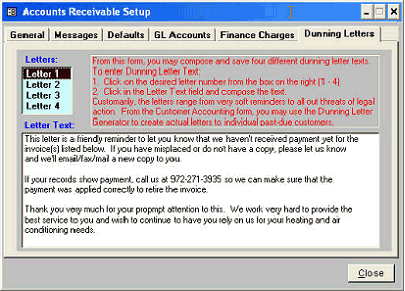
One of the functions of the Accounts Receivable module in Quantrac 2005 is the ability to create and send (via fax,
regular mail, or email) dunning letters to remind customers of outstanding and past due accounts. This section of
the manual covers the setup of the Dunning Letters function. Instructions are on the form to aid in setup.
After completing the Accounts Receivable Setup, click the Close button at the bottom right hand corner of the form.
You can go back to edit or modify any of the previously set parameters at any time with the appropriate system user
security permissions.
You may now enter old currently outstanding invoices and invoices.
This AR module provides for four
different Dunning Letters to be pre-
composed for letter generation. The
first message should be a mild
reminder. Subsequent letters should be
more direct and firm. The fourth letter
should warn of legal action or the
matter being turned over to a collection
agency.
An example of a typical Letter #1 is
included with your system to aid in
composition of your company’s
custom letters.
|
 |
|