


 |
 |
 |
 |
 |
|
 |
 |
Part 7 – Accounting - 11 -
Setting Up Finance Charge Parameters
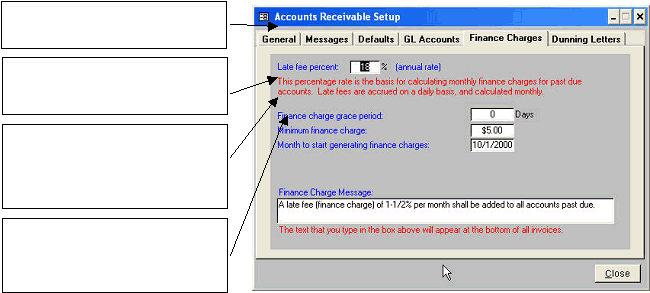
This form contains all parameters necessary in order to calculate finance charges for past due invoices.
The finance Charge Message will appear at the bottom of all invoices to alert your customers of your company’s
late charge policy. To eliminate the message, simply highlight the text and depress either the ‘Enter’ or ‘Delete’
key on your keyboard.
Click the Dunning Letters tab to go to the final Accounts Receivable Setup section.
The late fee annual percentage rate is
entered here. (18% is customary, but you
may enter any rate desired)
The Finance Charge Grace Period is the
number of days after the payment becomes
past due before finance charges begin to
accrue.
The Minimum Finance Charge is the
amount, which will cause a finance charge
to be accrued for an invoice during one
period. For instance, if the minimum
amount is $1.00, no finance charges will be
counted if they are less than one dollar.
Enter a date here in the month in which your
company desires to begin generating
finance charges in Quantrac 2005. This is a
‘one-time’ entry that should never be
changed.
|
 |
|