


 |
 |
 |
 |
 |
|
 |
 |
-
10 - Part 7 – Accounting
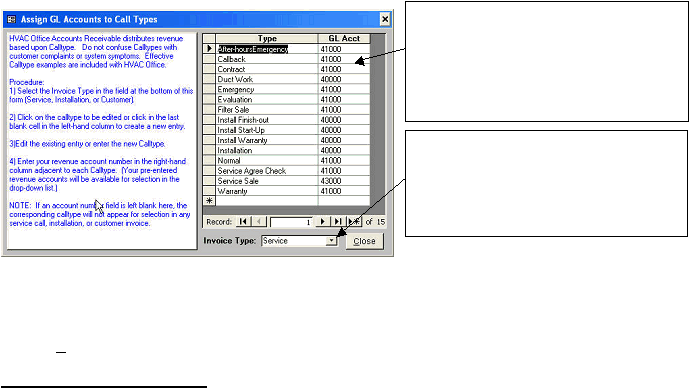
In this step, you will assign General Ledger accounts to your pre-defined list of calltypes for Customer Invoices,
Service Invoices, and Installation Invoices. Clicking the Assign button will produce the following form. In this
example, notice that the calltypes for ‘Service Invoices’ is displayed here. Instructions are included on the form.
Notice in this example that GL accounts 41000 (Service Revenue) and 40000 (Installation Revenue) are assigned to Call Types
in Service Invoices. This is because the example company occasionally invoices installation work (install a new supply, install a
new coil, install a new outside unit) via a service invoice, and desires that the Installation Revenue account be credited for this
work. Your setup, of course, depends upon your company’s desired internal departmentalization.
Click the Close button when finished.
Company Departmentalization
As companies grow, they discover the need to departmentalize their income and expenses to facilitate analysis of
the profitability of the different functions or profit centers within the company. For example, most companies
separate Installation revenue and Service revenue, since they are distinctly different operations, requiring different
direct costs to function. Quantrac 2005 employs a unique method of attaining departmentalization of revenue via
the Calltype and GL Account assignments in this section.
Quantrac 2005 Accounts Receivable module allows you to divide revenue created by an invoice to one of an
infinite number of GL revenue accounts. In other words, assigning a “Calltype” to a specific revenue account, the
system will result in the revenue created from all invoices with that calltype to that pre-assigned GL account. For
instance, a ‘Normal’ service calltype call may be programmed to post all revenue to the ‘Service Revenue’ GL
account. You may even subdivide further, creating calltypes of Commercial Service and Residential service, each
with a separate GL account.
In normal everyday operation, as service calls are received (or invoices are created), they may be designated
“Normal”, “Emergency”, “Commercial Service”, or any other ‘Type’ you may have defined in your system
customization. (The system will not allow revenue to be processed without defining a calltype for each service call,
Installation invoice, or Customer invoice.)
Your accounting summary and detail reports will show the revenue divided between the different revenue accounts
based upon the Calltype / GL Account assignments that you have set up following the instructions on this page.
To continue the Accounts Receivable Setup, click the ‘Finance Charges’ tab at the top of the form.
The Call Type is derived from
Setup|Lists|Calltypes on the Menu Bar. Select the
appropriate General Ledger account from the
combo box list (click the down arrow in the GL
Acct column adjacent to the selected calltype to
display a list of the GL accounts, their
descriptions, and the account type. Select a GL
account for each calltype shown here.
Click the combo box arrow here to change to
Installation Invoices or Customer Invoices. Select
a GL account for each of the Invoice types
that appear here. This will produce
consistent accounting and reporting of
business activity revenue in Quantrac 2005.
|
 |
|