


 |
 |
 |
 |
 |
|
 |
 |

Part 6 – Add-On Modules
-
9
-
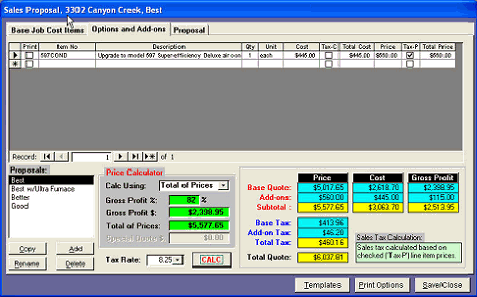
This example proposal includes
one option, an upgrade to “597
Super-Efficiency Deluxe AC”.
The retail price of this option is
$560.00 + tax. This item will
appear in the formal proposal in
the list of Options.
You may list as many options to
present to your customer as you
wish. The total proposed price
will include the calculated price
of the base installation plus the
total of the prices of all the
options. You have the
flexibility to price and tax the
options as you wish, by simply
editing the amount in the Price
column or selecting Tax-C, Tax-
P, or not selecting any tax at all if you desire.
Notice that the Price Calculator remains at the bottom of the form so that you can observe the customer’s price as
the items are selected.
Also, remember, this collection of prices is for the Quote that has been arbitrarily named, “Best”. In this example,
there are three separate Quotes. Each should have its own collections of parts, materials, options, labor, etc.
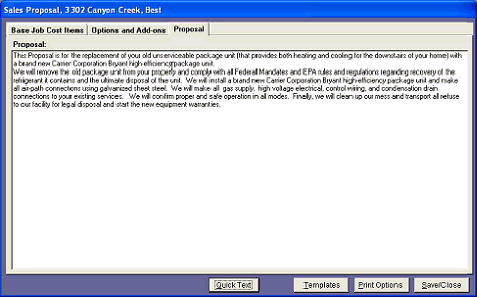
The third tab on this form
contains the actual Proposal
Text as you wish your
customer to read to understand
your offer. The text can be
unique to the selected Quote
for this Sales Lead.
One of the features of HVAC
Office is the ability to pre-
define certain text documents
and save them as Quick Text
for use elsewhere within the
system. The Quick Text
button at the bottom of the
form will cause Quantrac to
display text items that you
have saved for Proposals. See
Quick Text elsewhere in this manual.
Once you have established the pricing, text, add-ons, and options; click the Print Options button to preview or print
a Formal Sales Proposal or the Job Cost form. It’s a good idea to preview the proposal and proof read it first, to be
sure that it is what you wish to present to your customer.
|
 |
|