


 |
 |
 |
 |
 |
|
 |
 |

Part 6 – Add-On Modules
-
7
-
The Price and Cost calculator have the ability to price an installation using one of four different methods.
Total of Prices: Where your line item pricing is simply added to compute the quote price
Gross Profit Percentage: Where you select the profit margin you wish to realize from the installation
Gross Profit Dollars: Where you select the number of dollars of gross profit you wish to realize
Special Quote: Where you create an arbitrary price for the installation
Selection of one of the four algorithms will command the system to compute and display gross profit percentage
and gross profit dollars where applicable. You can change values for your calculations at any time.
If you wish to present optional add-ons separately from the base proposal, click the second tab at the top of the
page. This gives you a place to insert the options and add-ons from your list of items for sale. Notice that the
calculator in the bottom half of the screen stays available for you to see how your composition affects pricing each
time you click the “Calc” button.
In the lower left-hand portion of the forum the pricing sub totals and tax application can be viewed. Notice that you
can denote individual line items to be taxed at your established cost or the price you charge customers for each line
item. This is especially useful in states that treat contracted work and line-itemed work differently. Tax can always
be computed to meet the requirements.
Creating Multiple Quotes
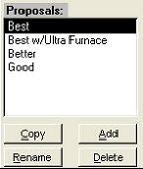
From this same form, the user has the ability to create a second, third, fourth, or
more Quotes that can be presented in their respective proposals. There are two
ways you can do this:
1.
You can click the “Add” button which will simply add another Quote to the
list for the selected Sales Lead.
2.
You can click the “Copy” button, which will copy your text proposal and all
line items into a new proposal
Either method will result in a new Quote for you to name and save with the system.
Deleting Quotes
You can delete quotes as you wish from any selected Sales Lead by simply clicking on the Quote to delete and then
clicking the Delete button.
Renaming Quotes
You can rename any quote as you desire after they have been created. For instance, you may have allowed the
system to create default names of “Proposal 1”, “Proposal 2”, etc. but later wish to rename to “Good”, “Better”,
“Best”.
|
 |
|