


 |
 |
 |
 |
 |
|
 |
 |

-6-
Part 6 – Other Features and Functions
A Sales Worksheet can be printed, providing a hard copy for your salesperson to take to the site. Attachments allow
the user to “attach” other Microsoft office files, pictures, etc. just as for Jobsites, Customers, Employees, etc.
When your customer accepts your installation proposal, you should click the Create Installation button. The system
will automatically check the Successful Sales Effort box and ask if you wish to archive the call. (The normal
answer to this question is “Yes) The system will also create an installation from the data contained in the Sales
Lead form. From there, you may track the installation through its phases using the Installation scenario already
discussed elsewhere in this manual.
This is an example of the second tab of the Sales Lead form. The top third provides a place for scheduling
appointments and their specific
notes.
The Site Preview & Customer
Comments allows for recording
salesperson’s observations at the
customer’s property. This text
will appear on the formal
proposal.
The Proposal field is used to
create the custom text for the
specific proposal, to be presented
to the customer. This text will
also appear on the formal
proposal. This text will also be
available when you create Sales
Quotes.
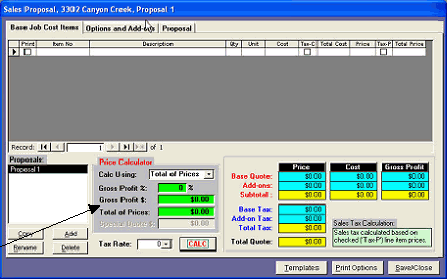
The Sales Quote and Calculation Form
Quantrac2005 provides for the creation of multiple Sales Quotes for Sales Leads. Most dealerships use this feature
to create “Good, Better, and Best” Proposals. Click the Sales Quotes button on the Sales Lead form .
If this is the first Sales Quote for a
particular Sales Lead, the system
will create the default name,
“Proposal 1”. You may change that
name at any time. Subsequent
proposals will be named “Proposal
2” (if #1 already exists) and so on.
It is customary to change the names
to more meaningful words or
phrases to make it easier to pick the
desired Proposal from a list of
several. For instance, “Good,
Better, Best”, or “w/Ultra 355”, etc.
This form also includes the
Price and Cost Calculator.
|
 |
|