


 |
 |
 |
 |
 |
|
 |
 |
Part 6 – Add-On Modules
-
37 -
Callahan/Roach or Profit Strategies as Online Price Books
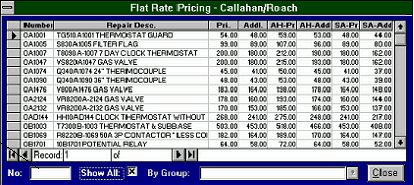
You can access your flat rate pricing data at any time by clicking the F/R button on the toolbar. The following “Flat-
Rate Pricing” form will be displayed. If, for example, you are entering a Service Call or Creating an Invoice and you
wish to access your pricing data immediately to answer a customer’s pricing question, you can simply click the F/R
button on the toolbar. If you have purchased Quantrac Corporation’s Custom Flat Rate Pricing and either Callahan
Roach or Profit Strategies products, a product-selection form will appear. Select the desired product to view your
pricing data. Once you have closed the pricing data form, the sales lead will reappear.
This is an example of Callahan Roach Flat Rate Pricing.
If you know the C/R
number for the
repair, enter it in the
No. field, and press
ENTER. The
selected item will be
displayed and
highlighted.
If you know the C/R group for the repair, (1) click the down-arrow in
this field; (2) select the desired group from the drop-down list; and
(3) use the arrow keys on the right side of the form to scroll to the
desired item.
|
 |
|