


 |
 |
 |
 |
 |
|
 |
 |
-36-
Part 6 – Other Features and Functions
Callahan Roach and Profit Strategies
Flat-Rate Pricing Modules
The Optional Vendor Flat-Rate Pricing module enables users of Callahan/Roach or Profit Strategies flat rate pricing
to access pricing data through Quantrac 2005 and to easily enter that data into invoices. Of course, subscription to
Callahan/Roach or Profit Strategies Flat Rate Pricing product is a prerequisite to utilization of this module.
Setting up the Flat Rate Pricing Module
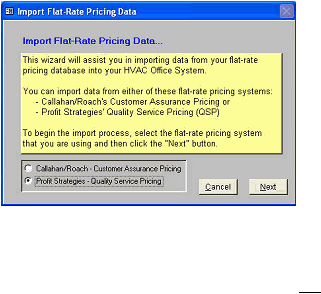
An import Wizard has been included with Quantrac 2005 to simplify the process of importing your custom pricing
from the compact disk(s) that are supplied by Callahan Roach or Profit Strategies. (You will need to have current
CDs from one of these two flat-rate pricing publishers containing all of your pricing data.)
1.
Start Quantrac 2005.
2.
Click “Setup | Import Flat Rate Pricing” on the
menu bar.
3.
The instructions for importing your Flat Rate Pricing
are included on each form of the wizard.
4.
Respond to each instruction. Note that this
procedure will overwrite any existing pricing data
you may have.
This procedure was recently updated when Callahan/Roach and Profit Strategies began distributing their data on CD
ROM (instead of on older-technology floppy diskettes). We have done extensive testing of the procedure and have
found it to be reliable in every test. The procedure does require data from either Callahan Roach or QSP, which must
be formatted to match our programming. If you have any problems or questions, please don’t hesitate calling our
Technical Support Department at 972-271-6898. We will do everything possible to help you succeed.
|
 |
|