


 |
 |
 |
 |
 |
|
 |
 |
-34-
Part 6 – Other Features and Functions
Update ALL Flat Rate Prices
During your business operation, it may be necessary to change your costs that affect multiple flat rate repair prices. To
achieve this, you may edit the Cost or Price of any Repair Item in any Flat Rate Repair. Upon taking this action, the
system will search through all of your flat rate pricing items, indicating to the user the number of repairs that contain
the changed item, and asking if you wish to make the same change to all of the repair items encountered. The usual
answer is “Yes”.
Then, clicking the Update all Flat Rate Prices button will command the system to analyze and re-price your Flat Rate
Repairs, using the new item costs. (Each repair will use its pre-selected method of retail price calculation).
Entering Flat Rated Repairs into Invoices
As you conduct business, you will be creating invoices for presentation to your customers for payment. The topic,
“Invoicing” in the section “Using Quantrac Basic Operation” (Part Three of this manual) thoroughly explains the
process required to create invoices. You should review and understand creating invoices, as described in that chapter.
Entering a Flat Rate Repair is very similar to entry of time and materials pricing.
On the Service Invoice form, click the
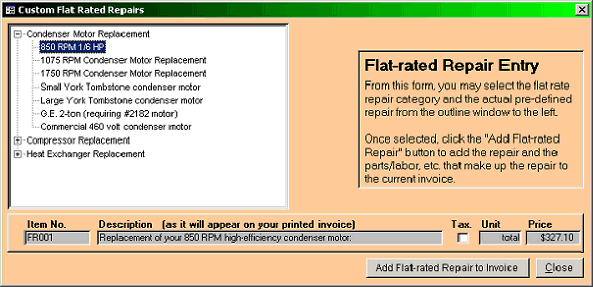
Enter Flat Rates button. This form will appear:
All of your Flat Rate Repairs are contained in the outline window in the left-hand side of this form. They are
organized exactly as you sorted them during the Setup. Click on the “+” next to the Categories to expose the list of
repairs that you have pre-established. Click on the repair to select it. The Description (as it will appear on your printed
invoice) along with its tax status, unit measure, and retail price will appear.
Click the “Add Flat-rated Repair” button to complete the entry.
You may enter as many repairs into a single invoice as needed.
You may combine Time and Materials pricing with Flat Rate Pricing in any Service invoice.
You may edit pricing and costs within the invoice.
You may apply discounts to Flat Rate Repair invoices.
You can add overtime or premium charges to Flat Rate Repair invoices.
You may delete or add other items to the Flat Rate repair.
There are many ways in which you can use this feature.
|
 |
|