


 |
 |
 |
 |
 |
|
 |
 |

Part 6 – Add-On Modules
-
21 -
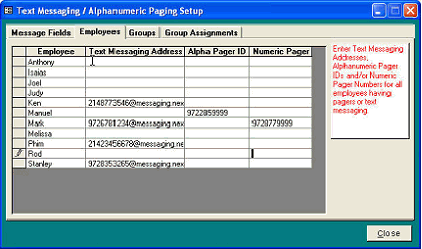
You can enter digital alphanumeric and digital numeric paging access numbers using this form. An employee can have
either or both types of pagers assigned. The Alpha Pager ID is the code number that your paging service assigns to the
individual paging receivers. The Numeric Pager No. is the telephone number you would normally dial (manually) to
activate an employee’s pager.
1.
Your active employees’ names will
appear in the Employee field
column. To add a name, you much
add an active employee using
Setup|Employees
2.
Enter the Text Messaging Internet
email address (if applicable)
3.
Enter their Alpha Pager ID number
in the second field (if applicable).
4.
Enter their digital numeric pager
access numbers in the Numeric Pager
No. field for each employee(if
applicable).
5.
Select the Paging Groups tab to
continue the setup.
Note: An employee can have either a digital alpha-numeric pager, a numeric pager, text messaging, or all.
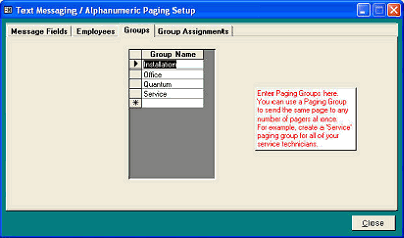
The Quantrac 2005 allows you to select pre-defined groups of employees to page. With this feature, you can
transmit an alpha-numeric page message to all members of a group of employees with one page action. You have
the ability to define the groups, the members of the groups, etc.
1.
If you wish to transmit pages to a
group of employees, define and enter
the group names here.
2.
Click the Group Assignments tab to
continue the setup.
The final step (in the paging setup) is to assign employees to groups. You may assign an employee to more than
one group if you wish. (Note: group setup is not necessary for individual paging of employees to function.)
|
 |
|