


 |
 |
 |
 |
 |
|
 |
 |

-18-
Part 6 – Other Features and Functions
Company Tools
This feature is included with Quantrac 2005 Professional. It is available as an option for Quantrac 2005 Standard.
As an HVAC contracting/service grows, it usually acquires expensive company-owned tools. Some are checked
out to employees on long-term basis (i.e.Extension Ladders, Refrigerant Recovery Machines, etc.). Other tools may
be warehoused at your main facility, to be checked out as needed for a particular job or task. Quantrac 2005’s
“Company Tools” module included the ability to inventory all company-owned tools. With the ability to check
tools to employees (vehicles), and keep permanent records of the location of all tools, your company will operate
more efficiently and professionally.
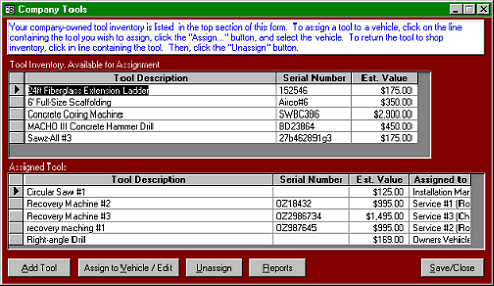
To access this feature, click “Functions|Company” tools from the menu bar. The following form will appear.
The Tool Inventory list
contains all of your
company-owned tools
which are not assigned to an
employee/vehicle.
The Assigned Tools list is a
collection of tools which are
assigned to the various
employees/vehicles.
In order to move any tool
from one vehicle to another,
it must first be moved back
to shop inventory, where it
can be reassigned. Editing
may not be performed on
items in the Assigned Tools
list.
In this example, five tools appear in the tool inventory. The lower window shows all tools that have been assigned.
Note the various vehicles in the “Assigned to” column.
Company Tools reports are accessible from this form by clicking the Reports button. Or, they may be accessed
from the “Reports” button on the toolbar.
Note: You may also access Company Tools from the Vehicles forms (since tools may be assigned to vehicles).
The following procedures are available:
1.
Add tools to your inventory
2.
Edit existing tool descriptions, values, etc.
3.
Assign tools to employees (vehicles)
4.
Return tools to inventory
5.
Remove tools from inventory
|
 |
|