


 |
 |
 |
 |
 |
|
 |
 |
Part 6 – Add-On Modules
-
17 -
Maintenance Scheduling
In the preceding example, the Installation Manager’s vehicle was selected (single click on the name of the vehicle).
In the lower half of the form, (the three tabs) the first tab is shows the future Scheduled Maintenance for this
vehicle. Notice that quarterly oil changes and lubrications have been scheduled.
To add a maintenance item to the schedule, simply place the cursor in the Due Date field in the first blank line.
Enter the date you wish to be alerted for the maintenance. When you hit the Enter key on the keyboard, the cursor
will move to the Description field allowing you to enter a description of the maintenance. You have 255 characters
to describe this event. The provider is the establishment that you intend to use for this maintenance. Do not enter
the Mileage, Cost, or Completion Date, as these fields are to be completed when the maintenance has been done.
Vehicle Maintenance History Log
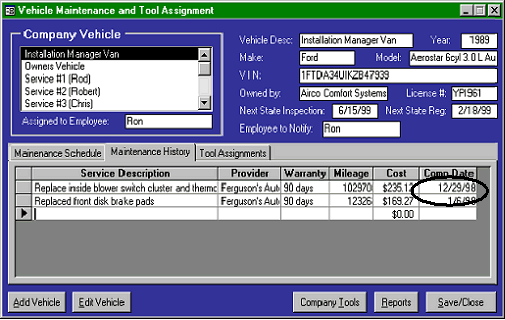
The second tab, Maintenance History, is shown in this form.
Notice that the Warranty, Mileage, Cost, and Completion Date are all filled. In fact, entering the Completion Date
will cause the system to
move the maintenance
from the “Schedule” tab to
the “History” tab. When
any scheduled maintenance
is completed on a vehicle,
the Completed Date should
be filled (in the Scheduled
tab) If the maintenance is
unscheduled, it should be
entered and completed here
in the History tab. You
may also record your
service provider’s name,
their warranty policy, the
vehicle mileage, and the
cost of the service for
future reference.
To take advantage of the system’s notification feature for State Inspections and Registration, enter the date for each
in the appropriate field. Also, select the Employee to Notify from the drop-down list of your company employees.
(use the Edit Vehicle form). The system will notify that employee, beginning one week before either of the two
parameters are met. It will re-notify every day, or until the event that triggered the notification has been updated to
the next year’s requirements.
Hint: Service Managers, Installation Managers, or Office Managers are prime candidates for notification of
vehicle inspection, registration, and required maintenance.
Reports
The Vehicle maintenance feature of Quantrac 2005 includes three reports, “Information”, “Service Schedule”, and
“Service Log”. They may be accessed by clicking the Reports button on the Vehicle form. Or, you may access
them from the reports button on the toolbar.
|
 |
|