


 |
 |
 |
 |
 |
|
 |
 |
-16-
Part 6 – Other Features and Functions
Company Vehicle Maintenance & Log
This feature is included with Quantrac 2005 Professional. It is also available as an optional add-on to Quantrac
2005 Standard.
Owning vehicles and providing them for your employees’ use includes certain responsibilities. This integrated
module provides a means for keeping track of your company vehicles, their scheduled maintenance requirements,
state registration and licensing. This feature also maintains a history of completed service. The vehicle service log
may be a valuable asset in establishing your company’s ongoing policies and practices regarding the roadworthiness
and safety of the vehicles you provide.
Lastly, (via the Quantrac 2005 internal email feature) the system will notify your company’s responsible
employee(s) when scheduled maintenance becomes due. It will also notify when state registration and safety
inspections are due. Messages will be sent daily until the registration and safety inspection is completed and
logged.
Accessing the Company Vehicle Function
This module is accessed by clicking Functions from the menu bar and then selecting Vehicle Maintenance from the
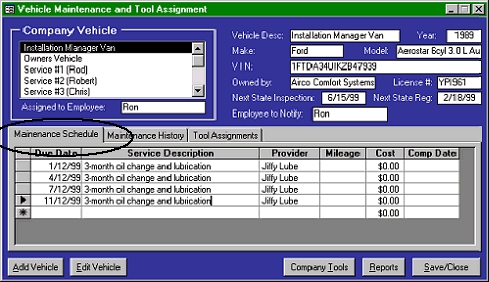
list. You will be presented with this special form:
This form can contain a
complete list of your
company vehicles. They are
displayed in the upper left-
hand corner of the form. In
order to add a new vehicle to
your fleet, click the Add
Vehicle button. To edit or
delete an existing vehicle,
first click on the name of the
vehicle. Then, click the Edit
Vehicle button. The
selected form will appear.
Hint: You may access the Edit form by simply double-clicking on the desired vehicle name in the form above.
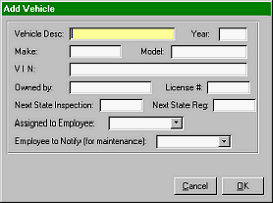
This “Add Vehicle” form is ready for you to enter
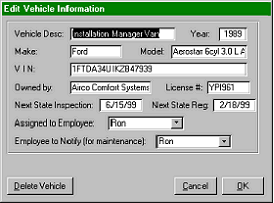
This “Edit Vehicle Information” form allows you
a new company vehicle to your fleet.
update information such as Inspection and
Registration dates, employee assignment, etc.
|
 |
|