


 |
 |
 |
 |
 |
|
 |
 |

Part 6 – Add-On Modules
-
15 -
Creating a new Sales Lead Template
There are three ways to create a new template:
1.
To create a template from a currently open sales quote:
a)
In the Sales Quote form, click the “Templates” button.
b)
In the Job Cost/Sales Quote Templates form, click the “Create New” button.
c)
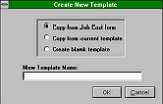
In the Create New Template dialog box, select “Copy from Job Cost/Sales Quote”.
d)
Enter your “New Template Name”.
e)
Click the OK button.
1.
To create a new template from an existing template:
a)
In the Sales Quote form, click the “Templates” button.
b)
In the Job Cost/Sales Quote Templates form, click on the existing
template in the “Templates” field.
c)
Click the “Create New” button.
d)
In the Create New Template dialog box, click on “Copy from current
template”.
e)
Enter your “New Template Name”.
f)
Click the OK button.
2.
To create a new template “from scratch”:
a)
In the Sales Quote form, click the “Templates” button.
b)
In the Job Cost/Sales Quote Templates form, click the “Create New” button.
c)
In the Create new Template dialog box, click on “Create blank template”.
d)
Enter your “New Template Name”.
e)
Click the OK button.
Deleting or Changing the Name of a Template
1.
To delete a template:
a)
In the Sales Quote form, click the “Templates” button.
b)
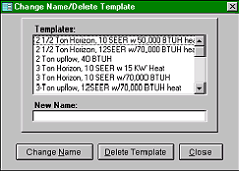
In the Job Cost/Sales Quote Templates form, click the “Chg. Name/Delete” button.
c)
In the Change Name/Delete Template dialog box, click on the desired template in the top section.
d)
Click the “Delete Template” button.
e)
When prompted, click the Yes button.
f)
If done, click the Close button on the Change Name/Delete
Template dialog box.
2.
To change a template name:
a)
In the Sales Quote form, click the “Templates” button.
b)
In the Job Cost/Sales Quote Templates form, click the “Chg.
Name/Delete” button.
c)
In the Change Name/Delete Template dialog box, click on
the desired template in the top section.
d)
Enter the “New Name”.
e)
Click the “Change Name” button.
f)
When prompted, click the Yes button.
g)
If done, click the Close button on the Change Name/Delete Template dialog box.
Inserting a Template into a Sales Quote
To insert a template into a sales quote:
1.
In the Sales Quote form, click the “Templates” button.
2.
In the Job Cost/Sales Quote Templates form, click on the desired template in the “Templates” field.
3.
Click the “Copy to Sales Quote” button. When prompted, click the Yes button.
|
 |
|