


 |
 |
 |
 |
 |
|
 |
 |

-12-
Part 6 – Other Features and Functions
Job Cost Module
Quantrac 2005’s Job Cost module (included with Quantrac 2005 Professional edition) allows you to create accurate
and detailed estimates and actual job costs for each installation. Using the job cost details, you can also quickly and
easily prepare a written proposal to present to your customer. By itemizing every piece, part, and component
necessary for a job (including labor), the system will give you an accurate wholesale cost of that particular
installation. You can also create and save “templates,” which allow you to quickly generate standard job costs and
avoid re-entering commonly used parts and services. A base quote calculator will help you determine your retail
price to charge for the installation. Finally, you can print a “pick list” (a list of all parts, supplies, equipment, rough
goods, etc. you have entered while creating a job cost), which can be used by your installation crews when they are
loading to go to a jobsite.
Creating an installation Job Cost
A job cost can be created in two ways:
1.
When you create a sales lead prior to closing the sale the system will automatically create a job cost using all of
the predefined items detailed in the selected sales quote. You may edit this job cost, with additions or deletions
or line item pricing changes. To display this form from a new or established Sales Lead, click the Sales Quote
button at the bottom of the form.
2.
If you did not create a Sales Lead and a Quote for this installation, you may create a new Job Cost directly from
the active Installation form.
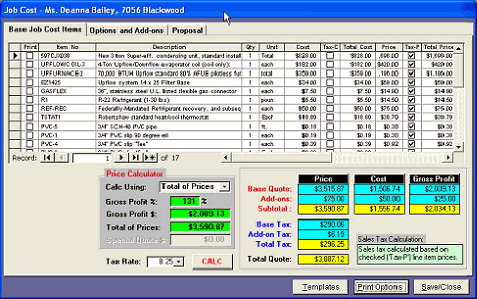
In either case, this form will be displayed.
Items entered on the “Base Job
Cost” form include your actual
cost and your retail pricing for
each item. These values can
be used in the pricing
calculation.
The “Options and Add-ons tab
enable you to add items to the
base installation. The job
costing operates exactly like
the sales proposal form above.
You can calculate profit using
one of four Price Calculation
methods.
The third tab contains a copy
of the selected Sales Quote if
you created one using the
system. If you created several Quotes, only the accepted Sales Quote information is copied into the Job Cost form.
|
 |
|