


 |
 |
 |
 |
 |
|
 |
 |

-
14 - Part 5 – Other Features and Functions
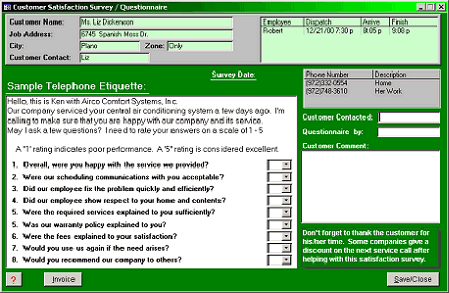
Using the example from the previous page, the Customer Satisfaction button was clicked, causing the system to
display this new form:
All customer information required
during a satisfaction survey is
included in this form. The
customer’s name, phone numbers,
the servicing technician, and a
sample telephone etiquette,
customized for your company and
the employee logged onto Quantrac.
Also displayed on this form is a list of
questions that you may wish to ask
your customer.
If using the included questions, you
can rate your customer’s perception
of your company’s performance on a
scale of 1 to 5. Use the combo box
to rate the performance at the end of
each question.
You may wish to enter the name of the person contacted in the Customer Contacted.
The name of the person conducting the survey can enter their name in the “Questionaire by: field.
If your customer has any comments that you wish to record, enter them in the Customer Comment field. You have
255 characters available for a comment.
If the customer brings up discussion about the invoice, you can instantly view that invoice by clicking on the Invoice
button at the bottom right hand side of the form. To see the computerized version of the invoice, click “Preview” on
the invoice form.
When you Save/Close this form, the Customer Satisfaction button on the archived service call will turn red, indicating
that this customer has been contacted. Also, the system will insert the date of this survey in the first column of
Customer Satisfaction list (first form in this series).
Customer Satisfaction Reports
There are two reports available to help analyze your company’s and employees’ performance in the field. Access
these reports by clicking the ‘Reports’ button in the toolbar at the bottom of the Quantrac screen. Then, select
Customer Satisfaction to display the reports for selection. The Customer Satisfaction (Bar Graph) has the ability to
graphically present individual service technician performance as well as for your entire service department.
|
 |
|