


 |
 |
 |
 |
 |
|
 |
 |

Part 4 – System Administration - 7 -
Backup / Restore
Computers can (and do) fail. One of the most catastrophic failures is that of a system’s main hard disk drive. If
your server computer’s hard drive (that contains your data file Hvac01.dat) were to “crash” you would want to
restore your data onto a new main disk drive as quickly as possible. Using Backup routines included with Database
Maintenance, this is quickly and easily accomplished. We strongly recommend that you back-up your data at least
once per day. Large offices with high activity should probably back up at least twice per day. The enclosed
Quantrac back-up routine compresses your data and writes it onto floppy diskettes. If you experience a computer
hardware failure, which renders your data unusable, you will have a recent back-up for resumption of business. You
can also backup your data quickly and easily by copying the DAT to another directory on the same computer or
another computer on the network. (Copy using your Windows Explorer if you are on Windows 95/98 or NT)
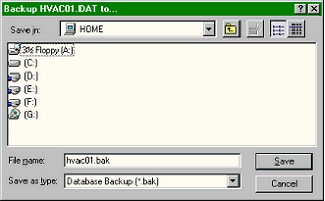
We have provided means for backing up your data for both On-Site and Off-Site storage. When you click the
“Backup to Hard Drive” button on the Database Maintenance form, the following directory tree will appear:
This is the Windows directory tree representation,
showing (in this case) the floppy drive(A:), the four
additional drives(C-F:), and the CDRom (G:)
Double-click on the drive and then the folder to which
you wish to copy HVAC01.Dat for backup safekeeping.
Click the Save button to make the database backup and
copy it to the selected folder.
(Copying files using this form is a normal Windows
routine, fully explained in your Windows documentation
or Windows Help)
Database Maintenance contains provisions for backing up the main database file (Hvac01.dat) and the Attachments
file (Attachments.dat). Both functions operate identically on their respective data files.
Below, several scenarios for On-Site backup are described; all of which use the form, above.
Scenario #1 (Single Computer office)
If you only have one computer on the network (with one hard disk drive), your on-site backup options are somewhat
limited. In this case, you can only backup your database to another directory (folder) on your single hard drive. You
should backup your main database to the C:\Quantum\Backup folder. This will protect you from accidental corruption
of your working database file. It will not offer any protection against catastrophic disk drive failure.
If you want protection from disk drive failure, we recommend purchasing and installing a second disk drive in your
computer. If you have the second disk drive, you have the capability of saving copies of your data on that drive. In
|
 |
|