


 |
 |
 |
 |
 |
|
 |
 |

-
6
-
Part 4 – System Administration
you experience a computer crash, power outage, or any other abnormal operation with HVAC Office, running the
Database Maintenance program will insure the integrity of your company’s (Attachments) data
1.
Start the HVAC Office Database Maintenance program (see the previous page)
2.
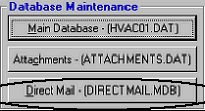
Click the second button from the top, Attachments (Attachments01.dat)
3.
Ensure that all systems on the network have closed HVAC Office. Click ‘Yes’
4.
The program will now check the integrity of your attachments database, repairing any repairable errors or problems. Upon
successful completion the system will report, “Repair of database (path) completed successfully.” Click the OK button.
5.
The program will begin compacting the database. Upon successful completion, “Maintenance Complete” will be reported.
Click the OK button.
6.
The HVAC Office Database Maintenance form will again be displayed for you to close or run one of the other functions.
Database Maintenance, Direct Mail
As you create mass mailings via HVAC Office Direct Mail (Direct Mail is an optional feature of HVAC Office),
records within the direct mail database file (Direct Mail.mdb) are created, edited, deleted, etc. During these normal
processes, the internal data structure is modified and altered in response to the direct mail commands and actions. We
recommend that you run the Database Maintenance Direct Mail program on a monthly basis. Furthermore, if you
experience a computer crash, power outage, or any other abnormal operation with HVAC Office Direct Mail
function, running the Database Maintenance program will insure the integrity of your company’s data.
1.
Start the HVAC Office Database Maintenance program (see the previous page)
2.
Click the third button from the top, Direct Mail (DirectMail.dat)
3.
Ensure that all systems on the network have closed HVAC Office. Click ‘Yes’
4.
The program will now check the integrity of your direct mail database, repairing
any repairable errors or problems. Upon successful completion the system
will report, “Repair of database (path) completed successfully.” Click the OK
button.
5.
The program will begin compacting the database. Upon successful
completion, “Maintenance Complete” will be reported. Click the OK button.
6.
The HVAC Office Database Maintenance form will again be displayed for you to close or run one of the other functions.
These processes only take a few seconds each (depending upon the size of your database). We place great
emphasis in running them so that your company does not experience problems that impact the service to your
customers.
|
 |
|