


 |
 |
 |
 |
 |
|
 |
 |
-
4
-
Part 4 – System Administration
If your data is located on a dedicated server computer, all workstation computers should experience approximately
the same data access speeds. In this case, since the data is remote to all computers. No computer will have a speed
advantage. With modern 100base-T networking and state-of-the-art computers, data access speeds should provide
fast and reliable operations on all computers.
Quantrac Database Maintenance and Backup
For your convenience, HVAC Office includes a Database Maintenance program, which enables you to maintain,
backup, and restore your valuable data files. This Quantrac program appears in the Quantrac Office group in your
Windows Start Menu or on your desktop. It should only be loaded on your “Quantrac Server” computer if you are
utilizing peer to peer networking.
In a typical installation, the Database Maintenance program should only reside on the computer that you have
designated as the Quantrac Server, where the database files reside on the Quantrac Server’s hard drive in the
Quantum\Data directory. The Database Maintenance program should not exist on workstation computers.
If you are using a dedicated server computer, you should load the Database Maintenance program onto that computer
for the most efficient database maintenance operation. Alternatively, you can place the Database Maintenance
program on one of your workstation, in which case it will do its work across the network to your dedicated server.
Beware, Database Maintenance will run much more quickly if it is located on the same computer as the actual data
files.
If you are using a dedicated server and server software such as Novell, see your network provider for backup
routines. Also, refer to the appropriate sections in this manual regarding Client/Server systems.
Starting Database Maintenance
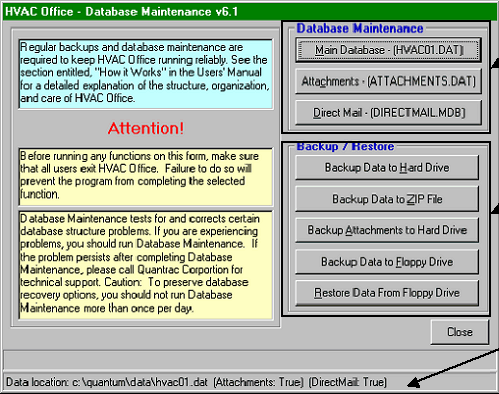
From the Start Menu, select Quantrac HVAC Office, Database Maintenance. This form will appear.
The left side of the form includes important information and instructions. The right side contains the buttons to initiate
the specific functions.
These buttons command
the Database Maintenance
functions for the three
database files used by
HVAC Office.
These buttons initiate the
four separate backup
routines and the Restore
from floppy drive functions.
This bottom status bar
indicates the location of the
main database (Hvac01.dat)
|
 |
|