


 |
 |
 |
 |
 |
|
 |
 |

Part 4 – System Administration - 11 -
Reattaching the Data Files
Your company’s data is stored in a file called “Hvac01.dat”. It should be located in the Quantum|Data folder of
your HVAC Office server computer (or on your dedicated file server) If the need ever arises to relocate your data
file to a different computer, each workstation running HVAC Office will need to be told of the new data location. A
special dialog form has been created for this task.
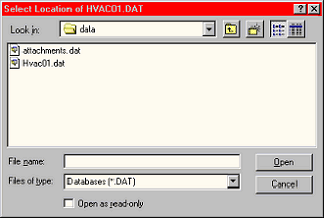
To access this form, click (in the main menu) Options|Reattach Data.
In this example, the files “Hvac01.dat” and
“Attachments.dat” appear (which had previously been stored
in the Backup folder).
By clicking the on the Hvac01.dat listing and then clicking
the Open button, the system will be commanded to reattach
to the data file selected. Caution, make sure that you are
connecting to the proper data file on the proper computer.
Each HVAC Office workstation computer should be
attached to the same data file. Otherwise, data integrity
cannot be assured. To check the data location, click Help
and About from the menu bar. The data location is listed on
that form, along with the program version, data version, etc.
If you have problems, please don’t hesitate calling for
Quantrac technical support.
This function is especially useful if the computer that contained the database (usually the Quantrac Server computer)
experiences a problem. If you have backed-up the data and attachments files to a workstation, you can simply tell all
of the remaining computers to attach to the backed-up DAT file.
|
 |
|