


 |
 |
 |
 |
 |
|
 |
 |

Part 3 - Using Quantrac 2005
-
53 -
Reports
Quantrac 2005 has a comprehensive set of reports (such as employee performance analysis, mailing labels, form
letters to customers, lists of expiring contracts, and refrigerants recovered and used) that enable you to better manage
your company. This chapter will provide an overview of this powerful feature. Rather than leading you through the
creation of every report generated by Quantrac 2005, we have selected some examples that will provide you with
sufficient knowledge to create any report.
Generating Reports
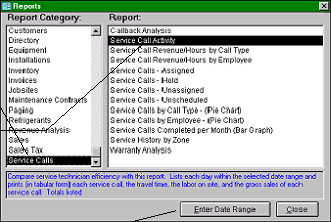
To generate a report, click the Reports button on the toolbar. This will open the following form:
An information area will describe each report. There are over 70 separate reports, some of which can be customized
in unlimited ways.
Examples
Generating a List of Assigned Service Calls
1.
Click the Reports button on the toolbar.
2.
In the first column on the Reports form, click on “Service Calls”.
3.
In the second column on the Reports form, click on “Service Calls - Assigned”.
4.
To preview and/or print the report, see Previewing/Printing a Report at the end of this section.
Generating a Price Book
Quantrac 2005 allows you to print price books consisting of all invoice items that have been entered into the system.
You may want to give these books to your technicians for use in the field. There are price books for service and
installation categories, showing either (1) price and cost; or (2) price only.
First you will click on a Report
Category.
Then you will click on the
desired report.
Depending on the report you
choose, you may be prompted
to provide additional
information, such as a date or
zip code range.
|
 |
|