


 |
 |
 |
 |
 |
|
 |
 |

-
52 Part 3 - Using Quantrac 2005
you have a reason for retaining the Customer with no Jobsites
Remember that this function is irreversible.
Move Zones and Equipment
Moving an Equipment Zone to a Different Jobsite
This may be necessary if an equipment Zone and its Equipment is inadvertently recorded into the wrong Jobsite.
Without this function, moving the equipment would require copying all zone, equipment, models, serials, etc. onto a
notepad and re-entry into the desired Jobsite.
First you must have the desired Equipment Zone open (go to the source Customer and Jobsite; double click on any
equipment in the zone you wish to move). Then, from the Menu Bar, select Utilities|Move Zone to a different
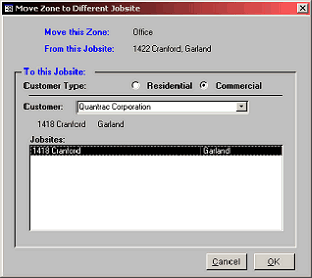
Jobsite. This form will appear:
To move the selected Zone to an existing customer (the
default setting), first click either Residential or
Commercial type. Then, begin typing the customer’s
name in the combo-box field. As you type, the system
will look ahead for Customers matching your entry.
You may have many customers with identical last
names, (for instance, Smith). Click on the combo box
down arrow to display the list of alphabetically sorted
names.
When you have the desired customer selected, a list of
the Jobsites for that Customer will appear in the
Jobsites window. Click on the desired destination
Jobsite in the window. When you have selected the
desired Customer and Jobsite, click OK. The Zone
with all its Equipment will be moved to the destination
Jobsite.
This operation is easily reversed by simply doing the process again, selected the desired Zone or destination Jobsite.
|
 |
|