


 |
 |
 |
 |
 |
|
 |
 |

Part 3 - Using Quantrac 2005
-
51 -
Moving a Service Call to a Different Jobsite
If a service call is inadvertently created for the wrong Jobsite, this function allows for easy correction. With the
problem Service Call on the screen, click from the Menu Bar; Utilities|Move Service Call to a Different Jobsite.
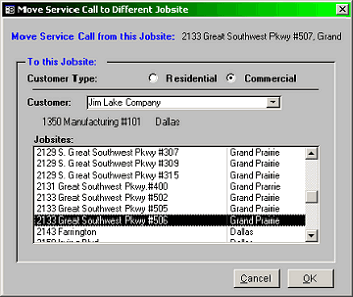
This form will appear on top of the Service Call form:
In this example, a Service Call has been created for
2133 Great Sw Pkwy #507. It should have been for
suite #506.
First, click either Residential or Commercial type.
Then, begin typing the customer’s name in the
combo-box field. As you type, the system will look
ahead for Customers matching your entry. You may
have many customers with identical last names, (for
instance, Smith). Click on the combo box down
arrow to display the list of alphabetically sorted
names.
When you have the desired customer selected, a list
of the Jobsites for that Customer will apper in the
Jobsites window. Click on the desired destination
Jobsite in the window. When you are sure you have
the right Jobsite, click OK. The Service Call will be
moved by the system.
This action is reversible by going through the procedure again and selecting the desired Jobsite.
Combining two jobsites
Combining two jobsites will merge installations, service calls, equipment, etc. from a source Jobsite to a Destination
Jobsite. This is a very useful tool, but the results are not easily reversible. If you select the wrong Source or
Destination Jobsite they will be combined. Undertake this function with extreme care!
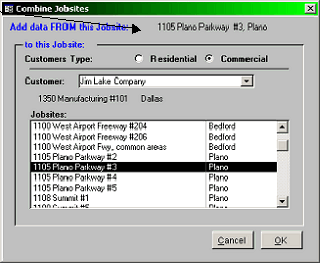
After selecting the desired Customer and Jobsite, click (from the Menu Bar), Utilities|Combine Jobsites. This form
will appear:
The source Jobsite will be shown at the top of the form.
First, select the desired Customer from the combo box
list (see the Move Jobsite example above for details).
You can combine two Jobsites from different customers
or from the same customer.
When you are sure you have the correct source and
destination Jobsites identified, click OK. All of the
information will be combined. This will also delete the
source Jobsite. If this is the only Jobsite from the source
Customer, the system will give you the option of deleting
this customer now. The normal answer is "Yes” unless
|
 |
|