


 |
 |
 |
 |
 |
|
 |
 |

-
50 Part 3 - Using Quantrac 2005
Move and Combine Jobsites
Moving a Jobsite to a Different or New Customer
In the normal operation of HVAC office, it may become necessary to move a jobsite from one customer to another or
to combine two jobsites together.
Example 1:
Your company does installations for building contractors at many addresses. As an installation
progress from start to finish, the Jobsite resides within the builder’s Customer record. When the
property sells to a customer, the computerized Jobsite should be moved to the new Customer
record.
Example 2:
A lease-space property owner/manager rents a space to a new tenant. For this landlord, all billing
is to be submitted to tenants for payment. When a jobsite changes tenancy from the landlord to a
tenant, you can move the jobsite to the responsible party and all subsequent tenants.
Example 3:
Your customer moves out of a home that you have serviced for many years. You have all
equipment, service, installation, and customer satisfaction records in Quantrac from the many years
of service to this customer. To avoid losing all of this valuable information, move the jobsite to a
special Customer for abandoned jobsites. Name the new customer _Abandoned Jobsites. (the
underscore assures that this customer will always be the first in any sorted list)
Example 4:
Your office failed to move Jobsites from customer to customer of the years. Now you find that a
particular jobsite address exists several times (for one or more customers) within Quantrac. You
may combine Jobsites, retaining all installation and service history in the final single Jobsite.
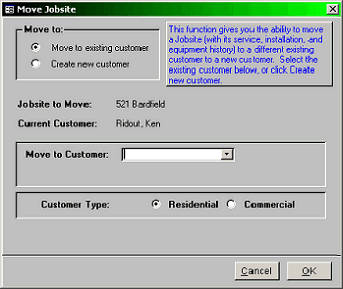
To move a Jobsite from one customer to another, first have the Jobsite you wish to move on the screen. Then, from
the Menu Bar, select Utilities|Move Jobsite. This form will guide you through the function:
To move the Jobsite to an existing customer (the
default setting), first click either Residential or
Commercial type. Then, begin typing the
customer’s name in the combo-box field. As you
type, the system will look ahead for Jobsites
matching your entry. You may have many
customers with identical last names, (for instance,
Smith). Click on the combo box down arrow to
display the list of alphabetically sorted names.
When you have selected the desired Customer, click
OK.
If this is the last Jobsite for the selected source
Customer, the system will ask if you wish to delete
the customer. The normal answer is “Yes” (unless
you have a reason for retaining the Customer with
no Jobsites).
If you move a jobsite to the wrong Customer, the recovery procedure is to simply do the procedure again, moving the
Jobsite to the preferred Customer.
|
 |
|