


 |
 |
 |
 |
 |
|
 |
 |
Part 3 - Using Quantrac 2005
-
5
-
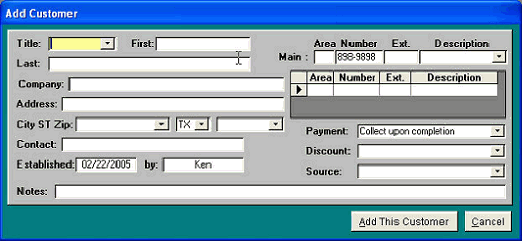
These fields contain
the customer’s MAIN
phone number (the
default lookup
number).
5. When you have completed the ‘Add Customer’ form, click the “Add This Customer” button. Your company’s
customer record will be added to the system, and your Customer form will be displayed.
Telephone numbers are unique. This is why Quantrac 2005 was designed with the telephone number as the default
“Find” parameter. Of course, you may also search by Customer/Business Name, Mailing Address, or any other phone
number in the Customer form. Additionally, you may search by jobsite address by clicking the ‘Jobsites’ button on the
main control form, followed by any part of the address. In fact, there are ten different parameters by which you may
search for a customer/jobsite.
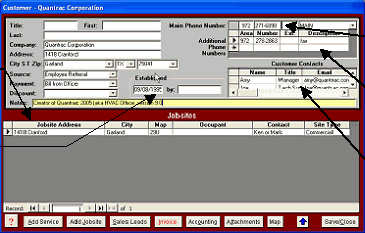
This is the completed Customer form with all information filled in. The top section contains the customers billing
information and telephone numbers. Notice the ‘Main’ telephone number. This is the
number that the system utilizes as the look-up phone number.
The buttons at the bottom/left of the form provide quick and easy creation of Service Calls and Jobsites. View a list of
Sales Calls for all Jobsites owned by this customer or create a new Sales Lead. You may create a ‘Customer
Invoice’ here, or view/edit this customer’s accounting parameters and invoice and credit memo history by clicking the
Accounting button. You may save a computerized picture, word file, sound, etc. using the Attachments feature button.
If you are connected to the Internet, the system will go to a free, world-wide mapping website to display the exact
location of the customer (based on the billing address.
The bottom section
contains a list of the
customer’s jobsites.
This area can contain
any number of
secondary customer
telephone numbers
Here, you may record
an unlimited number of
customer contacts,
their titles, and email
addresses. Double-
click in the email field
to generate an email
message to that
person.
The system will date-
stamp and record the
creation of new
customers in the
system.
|
 |
|