


 |
 |
 |
 |
 |
|
 |
 |
-
46 Part 3 - Using Quantrac 2005
If you want to record the actual direct costs of each callback, for a detailed or summary report at a later date, simply
create an invoice for the callback or warranty, recording the costs for each line item, but with a zero price. This will
create a $0.00 invoice for the customer…and record your actual direct costs for reporting.
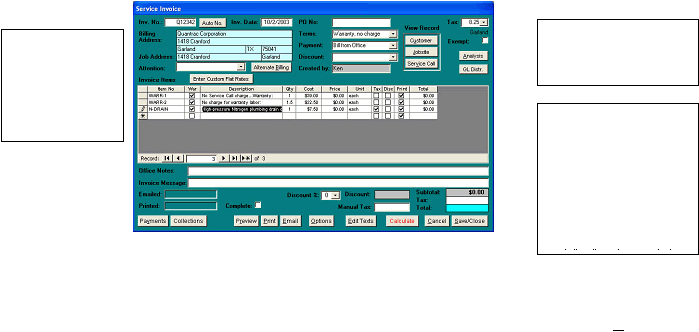
This is an example of such an invoice:
Notice on this invoice that the retail price to your customer is $0.00 for each line item and for the invoice total. Also,
notice that the cost column reflects your approximate direct cost for the service call, additional labor, and
parts/miscellaneous service. You can observe the relationship between costs and revenue by clicking the Analysis
button. The Revenue Analysis reports and Callback/warranties reports use this data to document and summarize the
actual direct costs or such calls. You also have the ability to show an analysis for all employees…or narrow the
scope of the report to just one employee.
The ‘Charge to’ field is for recording the offending employee. A list of your employees can be obtained from the drop-down list.
The Terms field will be filled
by the system with Warranty,
no charge…or Callback, no
charge.
A “CB” or “WARR”
check column will be
present on these
invoices. If checked,
the line item will
appear on your
callback or warranty
reports.
Enter $0.00 priced items from
your invoice items list to the
invoice. (see Invoicing
elsewhere in Part 2). If you
have set up your invoice
items properly, you will have
documented your direct
costs for each item of labor
or parts. The system will
record your direct cost for
|
 |
|