


 |
 |
 |
 |
 |
|
 |
 |
-
4
Part 3 - Using Quantrac 2005
Adding a Customer/Jobsite/Service Call
This section shows you some basic techniques for navigating the system by leading you through the process of adding
a new Customer and Jobsite record, then adding a new service call for a jobsite. (Note that these topics are also
covered in the flow charts.) This should provide you with a good introduction to Quantrac 2005, since most system
functions operate similarly.
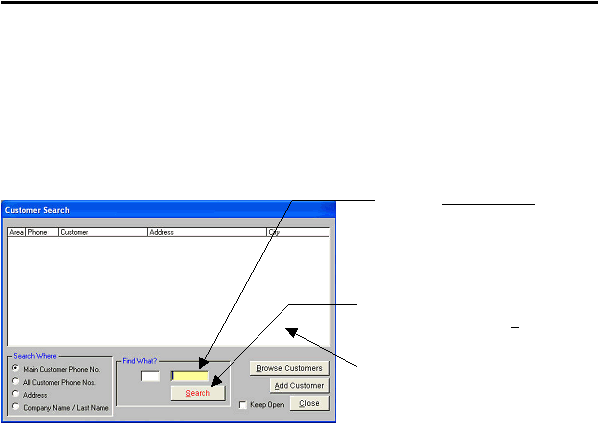
First, to search for a customer, click the “Customers” button on the Main Control form. This will open the “Customer
Search” form shown below. This form allows you to (1) locate an existing customer using phone number, last name,
company name, or address; (2) add a new customer; or (3) browse through your existing customers. For purposes of
this example, we will add a customer record for your company.
When the “Customer Search” form is displayed:
Note: If you do not enter an Area Code, but only entered the seven-digit phone number, the system will find all
of the customers based on that seven-digit phone number in all area codes if they exist. If you enter the area
code as well, the displayed list will be limited to those customers containing the selected area code as well.
4. If the phone number that you entered does not exist yet in the system, (and it probably won’t since this is your first
customer), the system will ask if you wish to add a new customer with that phone number. If you choose ‘yes’, an
“Add Customer” form, already containing your company’s phone number will be displayed. Enter all remaining data.
Whenever there is a “down-arrow” to the right of a field, click on it and select the desired entry from the “drop-down”
list.
1. Type your company’s 7-digit (excluding
area code) phone number in the “Find
What?” field. If you wish, you may also
enter the Area Code in the field to the left,
but it is not necessary for customer location.
2. Either depress the ‘Enter’ key on your
keyboard, or click on the Search button.
3. If more than one customer exists with the
7-digit phone number, they will all be dis-
played this area. Double-click on the desired
customer to display the selected customer’s
data form. .
|
 |
|