


 |
 |
 |
 |
 |
|
 |
 |
Part 3 - Using Quantrac 2005
-
39 -
Each of the steps is explained fully in the following pages.
Inventory Setup:
The Inventory Process starts with your company’s Invoice Items. As you use Quantrac 2005, you will undoubtedly
expand Invoice Items to cover every item you purchase and sell. In order to include a part or component in inventory,
it must be first added to your list of Inventory Items. The system has the ability to include or exclude any Invoice Item
in your inventory system. For instance, “Service Calls” would not normally be included in an inventory system;
whereas “Thermostats” would probably be included. Your inventory manager should examine each Invoice Item and
determine its inclusion in the inventory system.
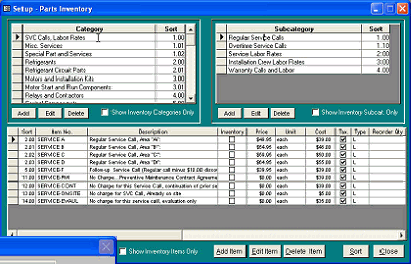
To access the individual Invoice Items for inclusion in the inventory system, click Setup, Parts Inventory from the
menu bar.
When this form appears, the check boxes for “Show Categories, Subcategories, and Inventory Items will be checked,
resulting in only those that have already been included in the inventory system appearing in the lists of Categories,
Subcategories, and Items.
To include existing Invoice Items into
your inventory system, either double click
on the selected individual part or select
the line containing the part with your
cursor and then click the Edit Item button
at the bottom of the form.
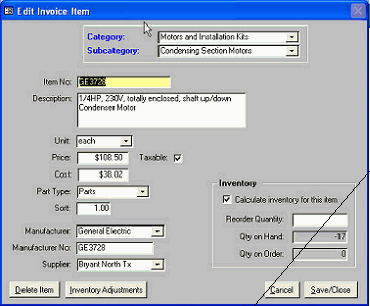
The Edit Invoice Item form will appear:
This is where you determine if this item is an
“Inventory Item”. In the “Inventory” box in the
lower right hand section of the form, you will want
to check the box labeled “Calculate Inventory for
|
 |
|