


 |
 |
 |
 |
 |
|
 |
 |
-
38 Part 3 - Using Quantrac 2005
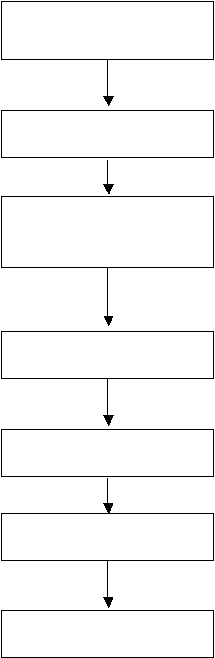
Inventory Setup
Select a Begin Date
Create and Submit
Parts Purchase PO’s
Receive Parts
Create Invoices
Manual Adjustments
Reporting
system; not an additional chore that must be accomplished. The Inventory Manager personnel at your office should
desire the automated process (over a totally manual process).
Finally, the virtual inventory must be as accurate as possible. With the constant receipt of items through the back door
and sales through the front door, the users must have confidence that if all human procedures are followed, the virtual
inventory will be a copy of the physical inventory.
The following is a simple flow chart illustrating the steps of inventory control. Each section is either covered in Part 2,
System Customization, or in the following pages.
Before the inventory package may be used, some setup is required. If you
have already setup Invoice Items you are already halfway there. You must
also determine which items are to be included in the inventory system. See
“Setup, Inventory Items” and “Setup, Parts Inventory” in Part 2 of this manual
The final step in the preparation of Parts Inventory is the selection of a start
date and the enabling of the Parts Inventory system. See illustration below.
The actual inventory process starts with the Parts Purchase Order. Access
this function from ‘Nuts and Bolts’ on the lower toolbar or Functions, Parts
Purchase Orders from the upper menu bar. All parts that are to be included in
inventory calculations must be ordered using a Parts Purchase Order. See
Parts Purchase Orders, below.
When ordered parts are received, they are checked in and the Purchase Order
completed. This results in the parts entrance into the parts into the virtual
inventory.
Inventory will be automatically decreased as those parts are sold and invoiced.
All parts must be sold in the same units as ordered and received. (i.e. if
ordered “by the foot”, they must be invoiced as “by the foot”)
Your virtual inventory system must match the physical inventory. This
requires manual intervention, either to adjust for parts returned to the vendor,
shrinkage, or for any other reason that causes the physical inventory to differ.
Your Quantrac 2005 inventory system includes LIFO, FIFI, Re-Order, Usage, Vendor,
Open, and Closed Inventory System reports.
|
 |
|