


 |
 |
 |
 |
 |
|
 |
 |
-
36 Part 3 - Using Quantrac 2005
Upon confirmation and after any revisions of your purchase order, you should create a receiving order by posting the
P.O. This computer-generated form analyzes the P.O., and creates a line item for each occurrence of each model
number. For example, if your purchase order includes 5 ea model 373LAV036070ABAA’s, the receiving order will
contain five lines, each with the model number 373LAV036070ABAA. As equipment is received, you should open the
appropriate receiving order (from the original purchase order form) and enter the serial number of each item. The
system will “date stamp” the received item automatically. This places the marked items into your inventory. You do
not have to print the receiving report…simply enter the serial numbers of the received items. You do have the ability
to print the report for processing a physical inventory.
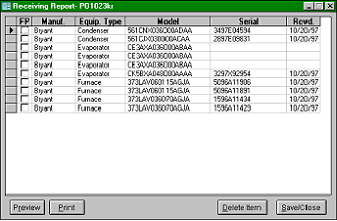
This form is a receiving report for an order that has not yet been fully filled.
Notice that three items have not yet been received.
When they are, the serial numbers will be entered from
the shipping report. The date received will be entered by
the system, or you may enter a different date.
When the equipment is received, it is placed into your
inventory, and will appear on inventory reports, etc.
The FP field is used with the “Floor Planning” option.
Note: You may view, preview, or print this receiving
report at any time…for any purchase order in the
system, in case you have a need to look back to
determine when a piece of equipment was ordered
and received by your company.
The system will check your inventory and all equipment you have installed at customer’s jobsites for duplicates before
allowing entry of specific model and serial numbers.
Selling/Installing equipment/reducing inventory:
As you install equipment for your customers, you should log the equipment installed at their jobsites into the proper
equipment zone. You can do this from any form within the system that has an Equipment button (i.e. Jobsite, Service
Call, and Installation). The customer’s jobsite is divided into Equipment Zones. A jobsite can have an unlimited number
of zones…such as a commercial property or apartment complex. Most often, a jobsite will have only one zone…the
“Only” zone. Within that zone, you should record the equipment installed by you or by others.
If you install your inventoried equipment into a zone, you will be able to select the actual serialized unit from the list of
your stock…and add it to the equipment list in the zone (at the jobsite). This reduces your inventory on hand by that
unit.
See Zones and Equipment in this section for a detailed description for installation of equipment at customers jobsites
and resultant decreasing of your in-house inventory.
|
 |
|