


 |
 |
 |
 |
 |
|
 |
 |
Part 3 - Using Quantrac 2005
-
31 -
Automated Equipment Zones
Quantrac 2005 contains a unique method of keeping track of equipment service or installed at customer’s jobsites.
This process includes automated equipment zones. It is used most often when creating a service call for a customer.
Here’s how it works:
1.
When you create a new service call, the “Zone” field must be filled. There are three sources of pre-
programmed information that can be used to fill this field.
a)
A list of established zones for the jobsite derived from the equipment function of Quantrac 2005
b)
A list of pre-entered (customized) zones, entered (see Quantrac 2005 system setup and customization)
c)
A list of zones which has been previously serviced by your company
2. Select the zone from one of these three lists, or enter a new zone now.
a)
If this is new zone, the system will ask if you wish to create a new equipment zone for this entry.
(spelling counts)
b)
If the new zone name is “All”, “Both”, “None”, or “Unknown”, the system will not attempt to create a
new equipment zone.
3. Continue creating the call normally.
At first, this may seem to be a lot of trouble for nothing. But, as your system matures with data and information, the
entries you make now will be invaluable. For instance, when a customer with a multi-zoned home calls for service,
you will know how the home was divided into zones, (i.e. Upstairs, Downstairs, Master Bedroom). Instead of
asking the customer which area of the house is affected by the A/C problem, you will be able to give the customer an
easily answered multiple-choice question.
“Mrs. Smith, are you experiencing the trouble in the Upstairs area; Master Bedroom area, or the Main part of the
house?” Mrs. Smith will be pleasantly surprised that you remember previous services at her home…and that your
company knows the layout. She won’t be able to get that service from your competitors.
This feature is extremely valuable when servicing multi-zone commercial jobsites! An example would be the jobsite
that has 5, 10, 20, or even more equipment zones. Each time you create a service call, you will have a ready list of
equipment zones that have been established in Quantrac 2005 for that jobsite from which to choose. If you sell a
maintenance agreement for the jobsite, the zones will already be established…reducing the requirements necessary for
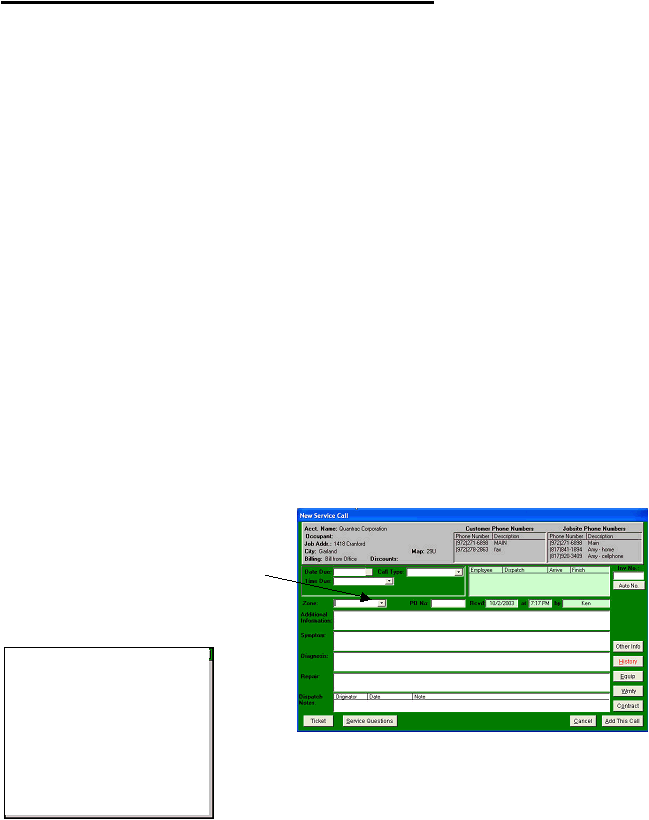
a new maintenance contract. This example shows a service call being created for a customer.
Click the “Zones” list box arrow to view a pre-
established equipment zone into this service call. All
zones that have been established for this jobsite will
be presented for selection in the drop-down list.
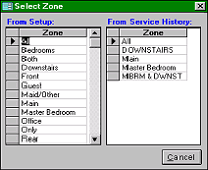
Double-click in the “Zones” field to display this Select Zones form which contains zone
names from your company’s Setup (left column) and zones as entered from the service
|
 |
|